Pololu Blog » Engage Your Brain »
Servo control interface in detail
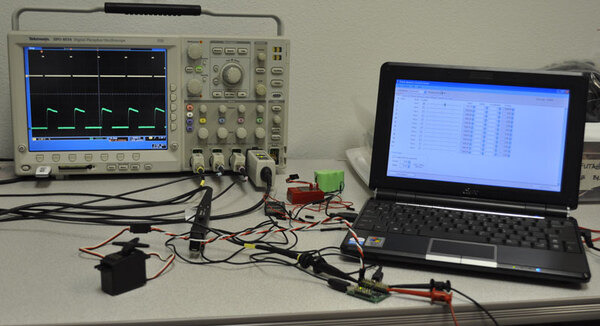
Last time, I gave a basic introduction to the simple pulse interface for sending commands to servos. In this post, I want to explore some of the details and ramifications of the servo interface in a bit more depth. I’ll be using the Mini Maestro 12-channel servo controller, which offers a lot of servo control flexibility, and a current probe with my oscilloscope to illustrate servos’ responses. Here’s the basic setup:
 |
In this close-up picture, you can see that I have the current probe on a servo extension cable so that I can easily change servos without touching anything else:
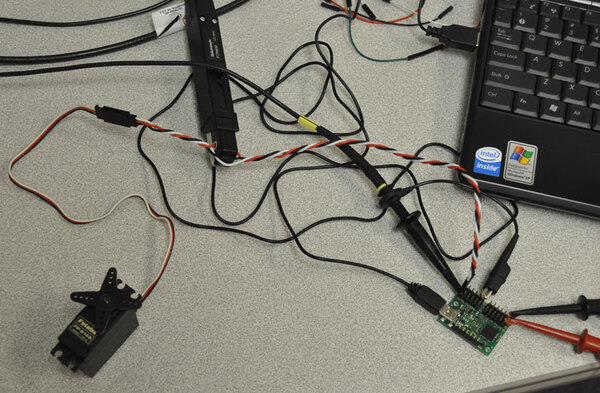 |
The red and black clips in the lower-right corner go to a variable power supply, and the netbook has the Maestro Control Center software running on it to allow quick changes to the servo control pulse width and frequency.
Before we get to some screen shots, let’s go over the basic signal we’re sending to the servo. The signal is a square wave, meaning there are two voltage levels between which we switch instantly (in real life, the transition has to take some amount of time, but that transition time is so short that we can approximate it as zero):
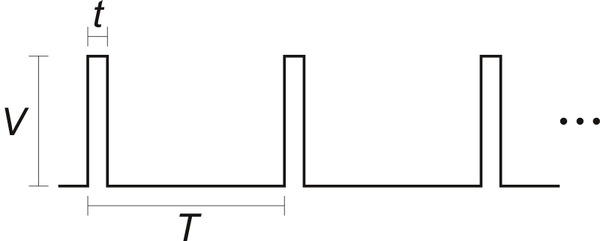 |
The signal alternates between zero volts and the pulse voltage, so there are only three parameters necessary to characterize the waveform:
- Pulse voltage, V
- Pulse width, t
- Pulse period, T
Let’s consider each of these parameters.
Pulse voltage
As we saw in the RC receiver output signals from last time, the pulse voltage can vary quite a bit. Modern receivers have 3.0 V signals, but many servo controllers use 5.0 V or more. For the most part, this signal amplitude does not matter too much, as a long as it is high enough for the servo to register the pulses, and the valid range is perfect for interfacing directly to a microcontroller that is running at 3.3 V or 5.0 V. We put 220-ohm resistors in line with the outputs of our servo controllers, which run on approximately 5.0 V; the resistors protect the pins in general but also prevent too much current from flowing in the event that the servo is running at a lower voltage than the signal it is getting.
Pulse width
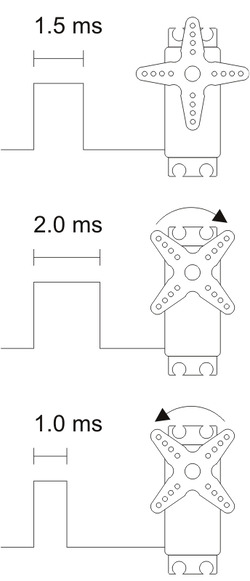 |
The pulse width is generally the most important part of the interface, and that is what we intentionally vary to change the command to the servo. The general idea is simple: a pulse width of 1.5 ms is what we consider “neutral”; increasing the pulse width will make the servo go one way, and decreasing the pulse width will make the servo go the other way. However, there are a few points you should keep in mind:
- The neutral point is not necessarily the middle of the servo’s absolute maximum range. For instance, a servo that is capable of 180 degrees of movement might have the output at the 100-degree point for a 1.5 ms input pulse. In that case, the available range would be 80 degrees to one side of neutral and 100 degrees to the other. The pulse width that corresponds to the middle of the available range will vary from servo to servo, even for servos that are of the same model, so if you care about getting the most range you can and having neutral mean the middle of that range, you will have to calibrate your system for each servo.
- There is no standard correspondence between the pulse width and the servo position. Generally speaking, moving from 1.0 ms to 2.0 ms will yield about 90 degrees of servo movement, but that pulse width range could correspond to 100 degrees on one servo and 80 degrees on another servo. This means that any servo controller or servo control library you might use that makes any claims about absolute degrees is hiding something from you (or designed by someone who doesn’t really understand the interface). If you change servos in your design, you might have to make corresponding changes in the range of pulses you send to it, so if you are doing your own servo pulse generation, it’s a good practice to have the neutral point and range of your servo parametrized in your code. (I’ll cover more on that in a future post.)
- Similarly, there is no standard minimum and maximum pulse width. If you keep making the pulses wider or narrower, servos will keep moving farther and farther from neutral until they hit their mechanical limits and possibly destroy themselves. This usually isn’t an issue with RC applications since only about half of the mechanical range is ever used, but if you want to use the full range, you have to calibrate for it and be careful to avoid crashing the servo into its limit.
- The direction that a servo turns for increasing pulse widths is not standardized, either (also, it’s usually not specified). In my diagram to the right, I show the output moving clockwise as the pulse width increases, but that could easily be the other way around. We can expect the correspondence to stay consistent between different units of the same servo model, but the direction of servo travel is yet another thing you should be able to change in your design without a lot of effort so that you have the option of changing servo models.
- The servo control interface is an analog interface. The signals look digital because we have square waveforms and we use digital microcontroller outputs to create them, but because what matters is the infinitely variable time that the pulse is high, the signal is analog, and any slight jitter in the pulse width will cause corresponding twitching in the servo output.
- Although we can use some pulse width modulation (PWM) hardware modules in microcontrollers to generate servo control signals, and we are changing (modulating) the pulse width, it’s not good to call the signals PWM signals because that implies the relevance of the duty cycle, which is the percentage of on (high) time of the signal. As we will see next, the frequency of the pulse train does not affect the servo position if the pulse width stays the same, so changing the duty cycle does not necessarily affect the servo position. Similarly, we could keep the duty cycle constant by stretching out both t and T by the same proportional amount, and the servo position would change since the pulse width had changed.
Pulse period
The typical pulse period is around 20 ms, which corresponds to a frequency of 50 Hz. One immediate ramification of the pulse rate is that it gives you an upper bound on how quickly you can give the servo new commands. Most servos can handle substantially faster pulse rates, and some special servos are designed to support pulse frequencies of several hundred hertz. However, a more subtle dependence on the pulse frequency shows a major difference between analog and digital servos, and that will be the focus of most of the rest of this post.
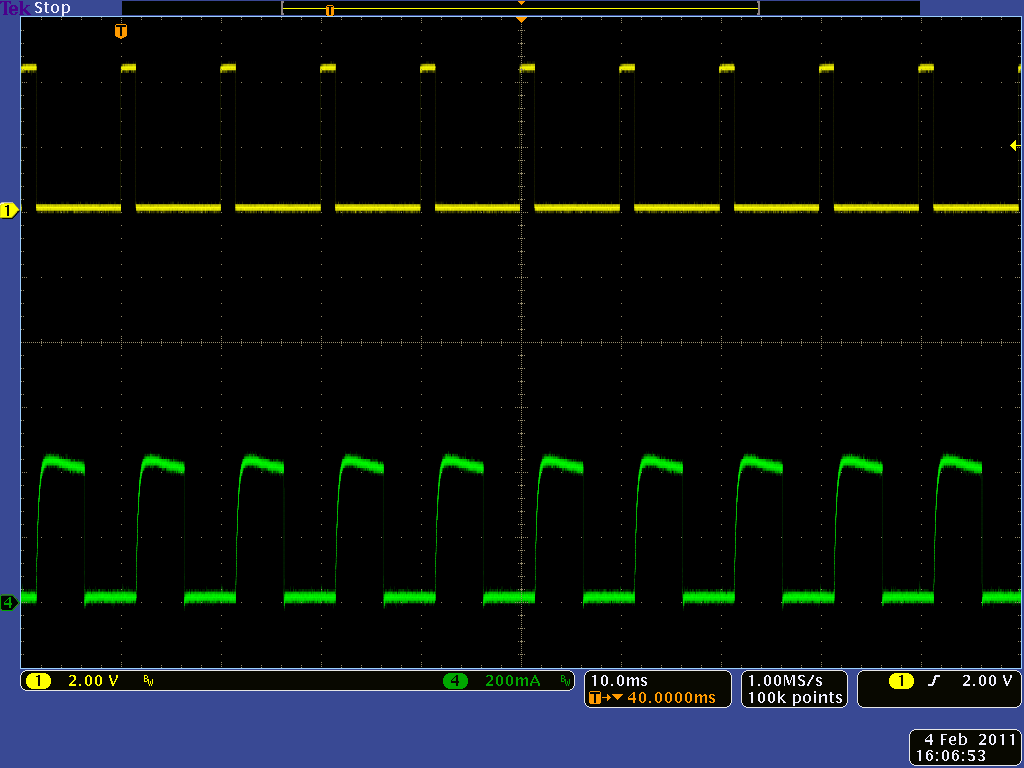
Here is the input signal and current consumed by a Futaba S148, a quintessential standard analog servo, connected to the setup I showed earlier:
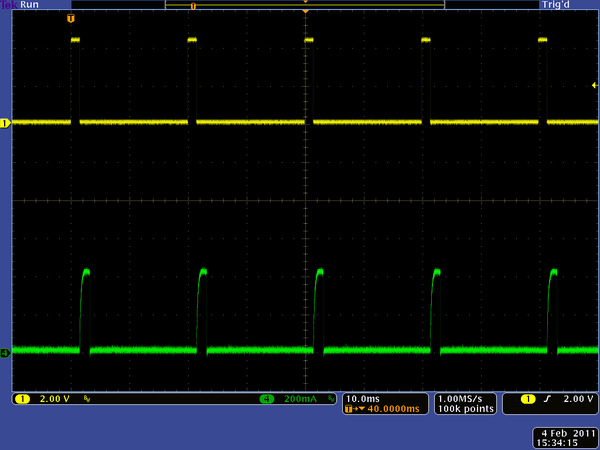 |
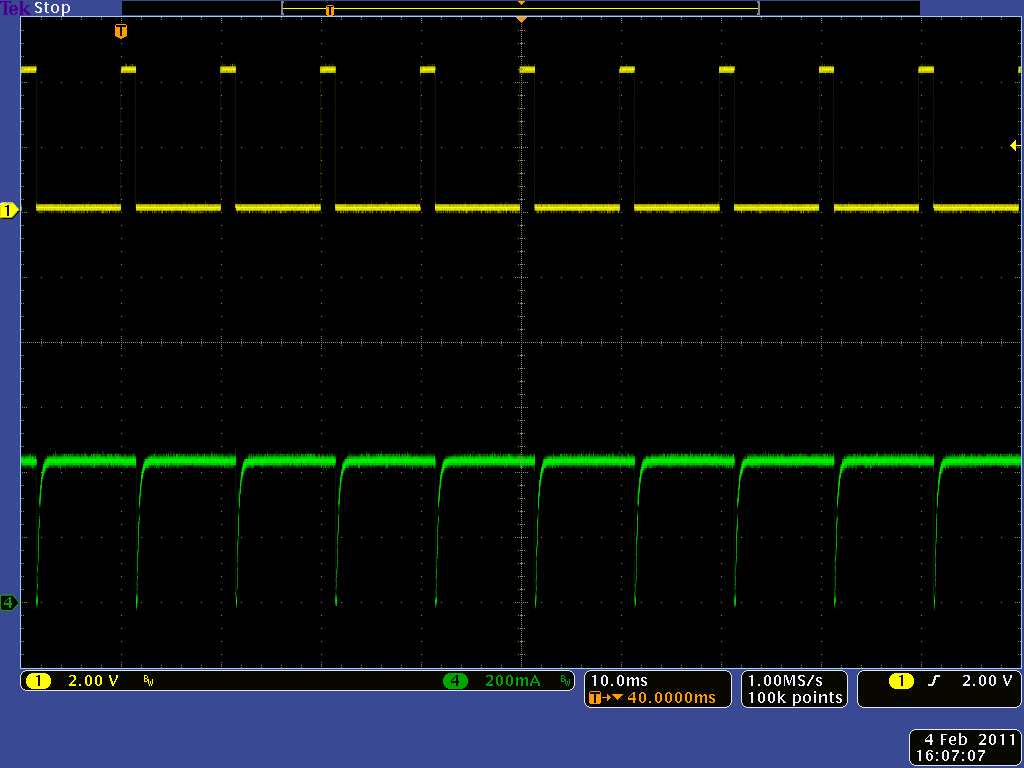
(The yellow trace on top is the control signal; the lower, green signal is the current used by the servo.) I was pushing slightly against the output shaft, and we can see that each command pulse is immediately followed by a pulse of current as the servo tries to push back against me. As I pushed harder, the servo pushes back for a longer time after each command pulse:
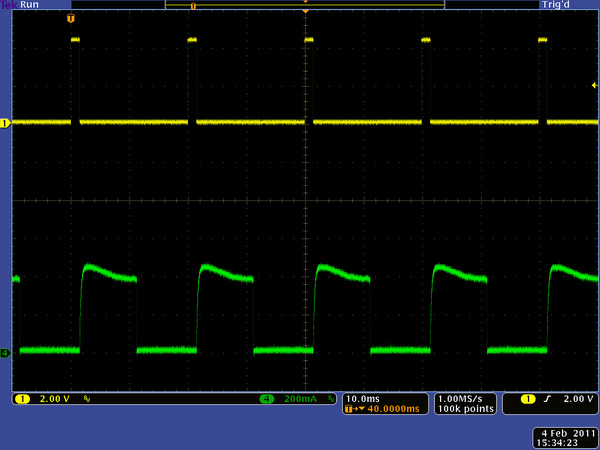 |
I had the power supply set to 3.5 V so that the servo could not push back as strongly as it could and possibly damage itself. If we reduce the pulse rate from 50 Hz to 20 Hz, we see that the current bursts also drop to 20 Hz:
|
|
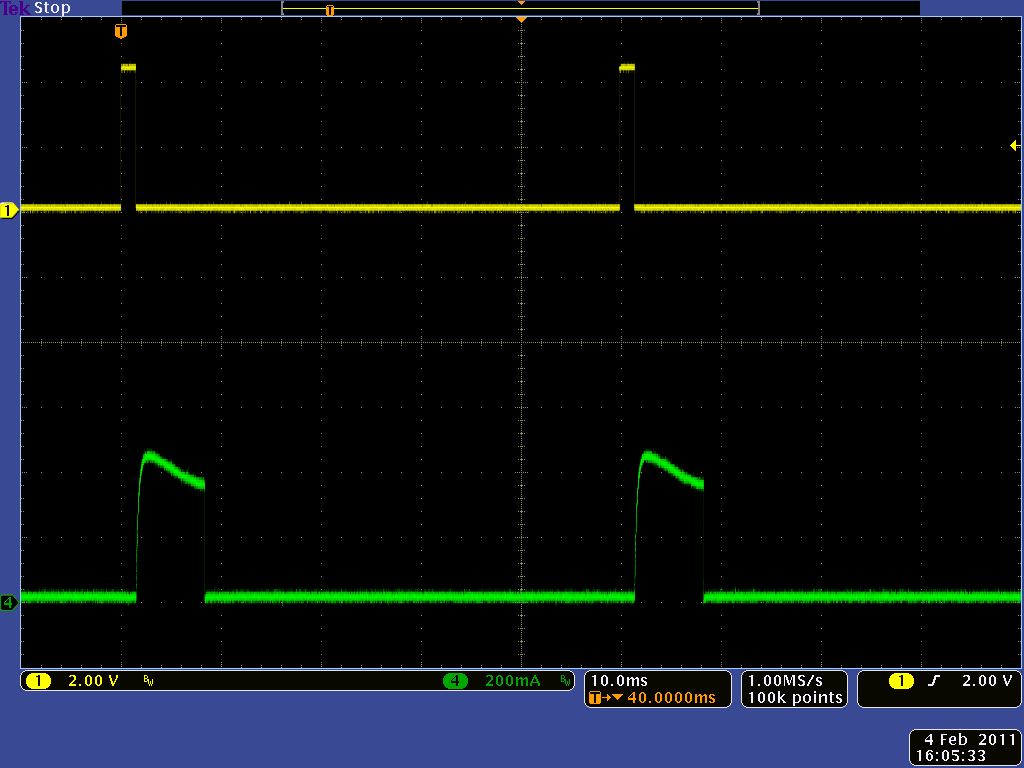
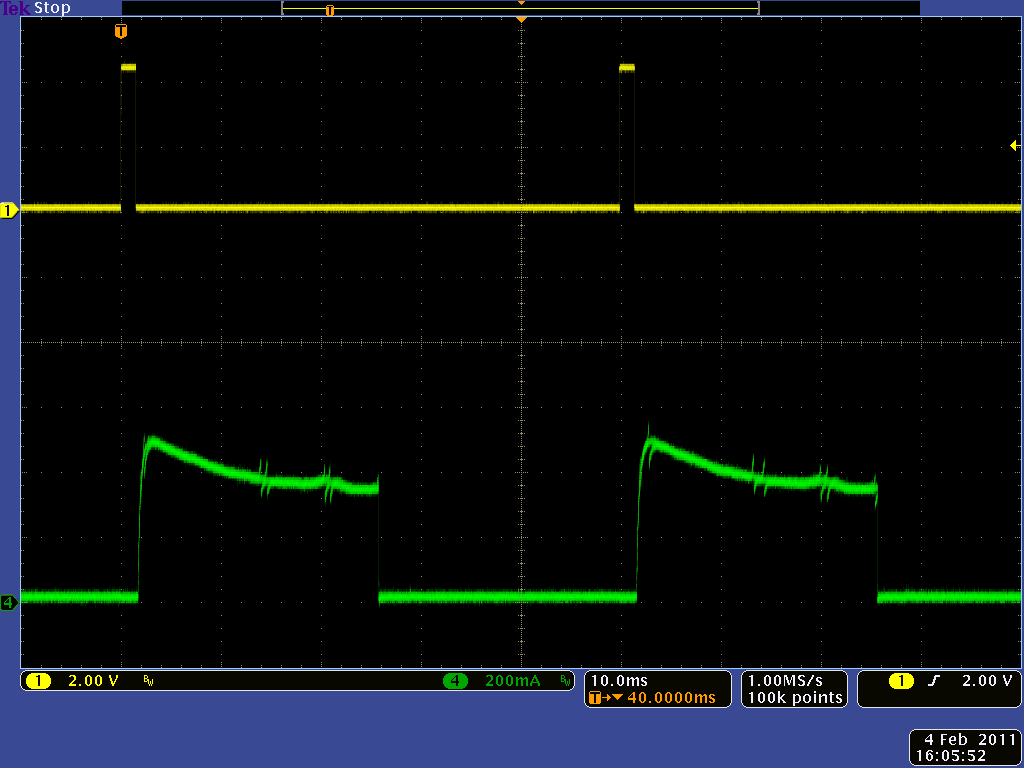
The servo still generally works at the lower pulse frequency, but the duty cycle (percentage of the time that it is pushing back) goes down so that its torque also goes down. As the pulse period gets even longer, the time between attempts to correct the servo position gets correspondingly longer, and at slow pulse rate like 10 Hz, the output torque has enough ripple that it is easy to feel. Shortening the pulse period has the opposite effect; at 100 Hz, the servo is pushing back almost 50% of the time even with a slight output resistance, and with a high mechanical load, the servo is pushing back almost 100% of the time:
|
|
A nice feature of this general operation of analog servos is that if you stop sending pulses, the servos will stop trying to hold a position and effectively turn off: they will no longer resist changes to the output position (whether they can mechanically handle backdriving is a separate issue) and reduce their current to the minimum idle value.
Digital servos have an internal microcontroller that allows the servo designers much more flexibility in how servos react. Next up, I have corresponding screen shots from a relatively high-performance digital servo, the GD-9257:
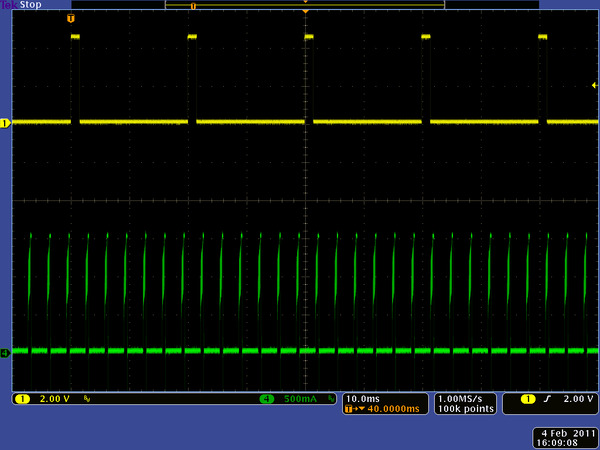 |
We see that the current pulses are much quicker than the control pulses; also, even with a slight output load, the peak current is past 1.5 A at only 3.5 V. At full voltage, the current peaks would be around 2.5 A, so we see that multiple servos can quickly become a very demanding load for a power supply. At a higher mechanical load, it is especially clear that the servo’s performance does not depend on the pulse frequency:
|
|
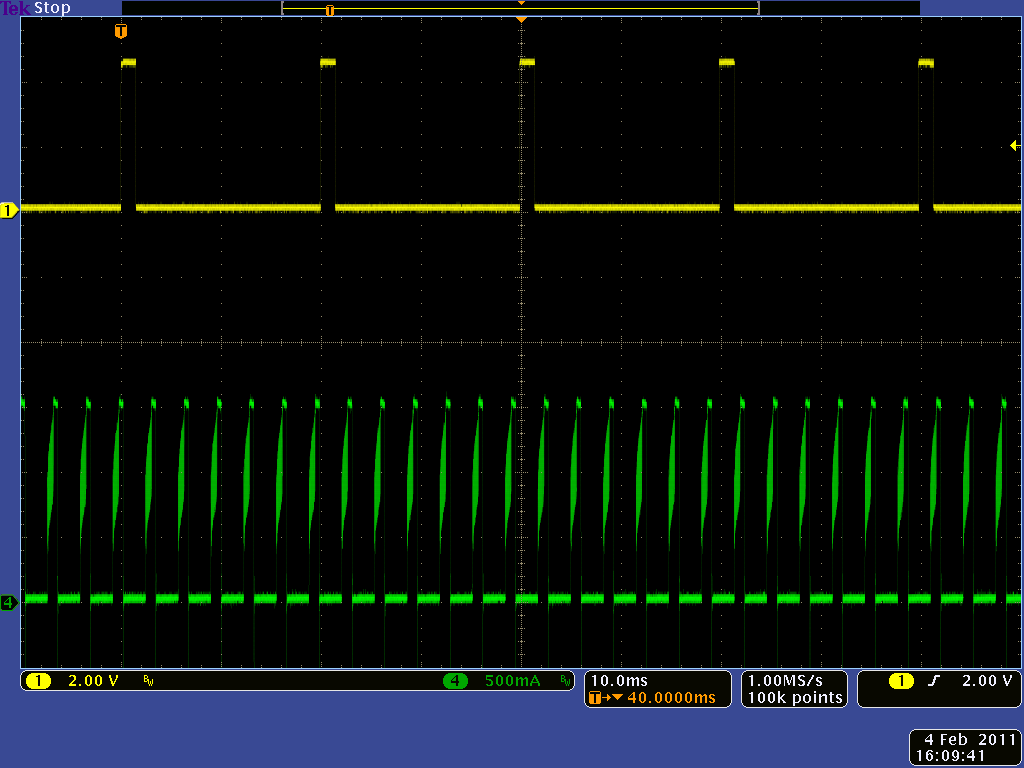
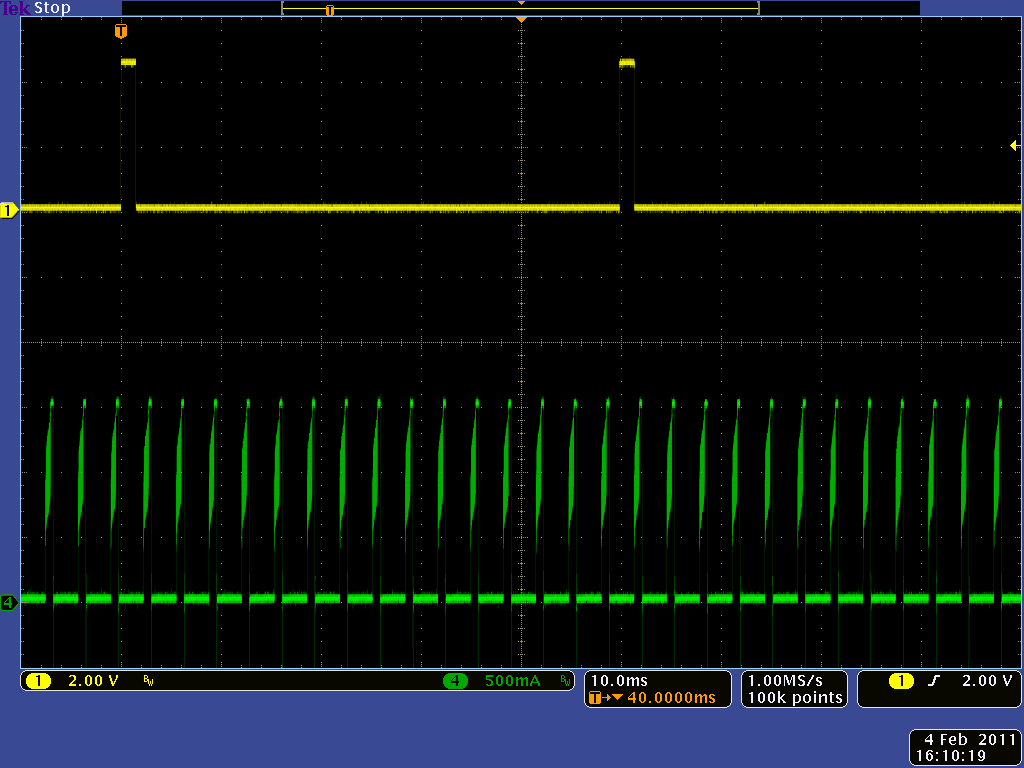
I tried various other servos, but they generally behaved the same way. One slightly more interesting unit was the DS8325HV high-voltage servo, which did not even operate at 3.5 V. At 5.0 V, the waveforms are similar to the earlier digital ones, but the current spikes are now up to 4 amps:
|
|
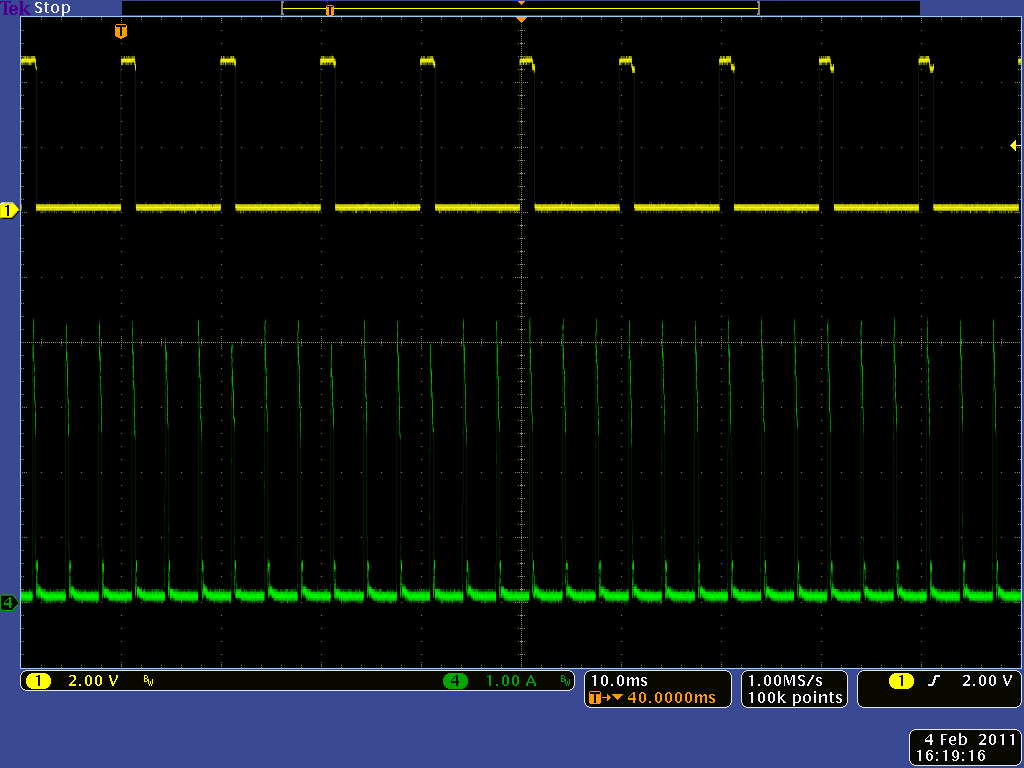
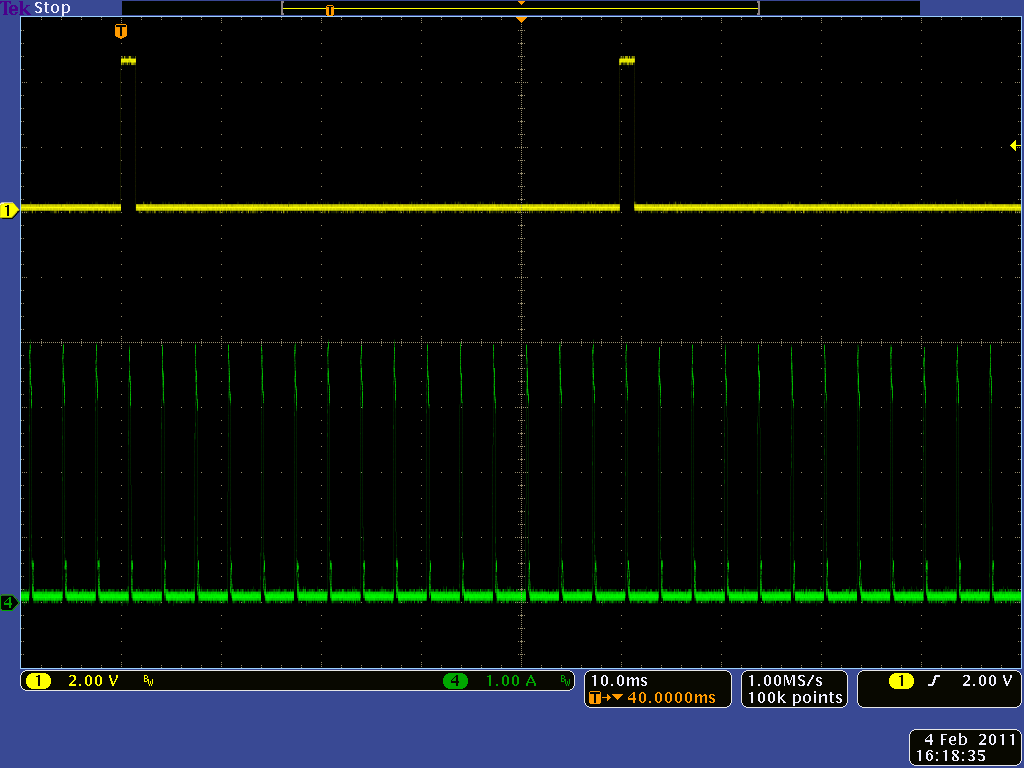
One of the most interesting distinctions among digital servos does not show up in screenshots: some digital servos continue holding the most recent position even if the control signal goes away, and other digital servos turn off. As usual with RC products, this behavior is not documented, and it can have important ramifications for robotics and other non-RC projects. For low-power applications, it’s great to be able to turn off a servo by not sending it control pulses. On the other hand, it can be nice to have a servo maintain its position if you have many servos to control and do not need to update their position often. For instance, if you have a 30-servo kinetic sculpture that does not need to move quickly, you could send each servo a separate command every ten seconds and comfortably generate each servo pulse separately; with analog servos or servos that turn off without a signal, you might be faced with the much more complicated task of generating simultaneous servo pulses.
I have one final fun screen shot to show you. This is back to the S148 servo, but this time, the oscilloscope capture is over a longer period, as the servo is moving:
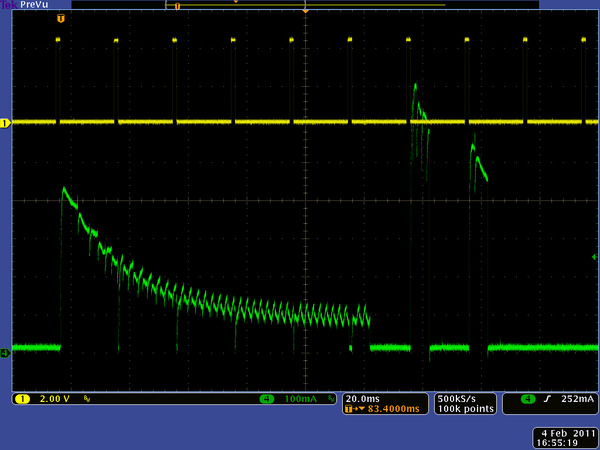 |
The first control pulse on the left is for a new servo position, and we see the current jump up as the servo starts moving. There’s no mechanical load beyond just the servo, so the current goes down as the output speeds up. As the servo reaches its destination, it overshoots slightly and changes direction, which causes the current to spike up even higher than the initial starting current.
Conclusion (for now)
At this point, you should have a good idea about the range of reactions servos could have to the control signals we send them. Next time, I’ll move on to considerations of how to generate those signals.
-
Robot Zero: a fast line follower for beginners
- 7 February 2011This excellent guide from C.I.r.E. (Club de Informática, robótica y Electrónica) shows in detail how to build a fast (> 2 m/s) line-following...
-

Instructable Groovin' Grover: a microcontroller-based marionette
- 14 February 2011Groovin’ Grover is a marionette manipulated by four hobby servos and a Pololu Maestro servo controller. You can control each of Grover’s limbs...
37 comments

One question, for my application I need as low power consumption as possible. The analog servos I've been using have been stripping gears which has led me to Hitec titanium digital servos. Unfortunately I did not realise they hold position as you mentioned. Is there any way you are aware of to set the servo controller (in my case mini maestro) to disconnect power to the servo when not in use? I guess a relay and another channel may be able to achieve this?
FYI the application is to have a single servo complete two complete cycles every 20 minutes.
Many thanks,
Mark.

It looks like you might have already asked about this on the forum some, and I don't really have a good answer. I would look around for different servos (you can get metal gears with analog servos, by the way), but if you like the ones you have, you'll have to go for the external power switch route you described. Some of the fancier servos are programmable or configurable, so you might check into whether the no-signal behavior of your unit can be changed.
- Jan


What is your basis for the 50% duty cycle requirement? In my experience, from textbooks to discussions with engineers to labels on test equipment, "square wave" means what you are calling "rectangular waveform". For instance, I think most function generators have a "square wave" button to access the rectangular waveform-generating features, not a "rectangle wave" button.
- Jan

I agree with Brad that "square wave" implies 50% duty cycle.
Just like a square is a special rectangle with equal height and width, a square wave is a special rectangle wave with equal high and low duration. The terms get used kind of interchangeably these days and I suppose one's personal take on it may depend on when/where you first learned the concept, or whether you were introduced to it from an analog, digital or mathematical perspective. I was introduced to it as a symmetrically clamped sine wave => 50% duty cycle!
From a mathematical perspective, a true square wave is an infinite summation of sin waves comprising the fundamental frequency and its odd harmonics, which also means it winds up having 50% duty cycle.
From Wikipedia:
"A square wave is a non-sinusoidal periodic waveform (which can be represented as an infinite summation of sinusoidal waves), in which the amplitude alternates at a steady frequency between fixed minimum and maximum values, with the same duration at minimum and maximum."
https://en.wikipedia.org/wiki/Square_wave
On the other hand, for practical discussion of electrical waveforms, since they all have "square" corners and we're just trying to get an idea across, it can be convenient to call any pulse/rectangular waveform a square wave characterized by a frequency and a duty cycle.
Cheers!
BTW, great series of articles on servos. Thanks for posting it!
In that spirit, I take back my previous waffling comment about "just trying to get ideas across". The servo signal is not a square wave; it is a pulse train. lol :)
ref wikipedia: https://en.wikipedia.org/wiki/Pulse_wave
"A pulse wave or pulse train is a kind of non-sinusoidal waveform that is similar to a square wave, but does not have the symmetrical shape associated with a perfect square wave."
Cheers,
RC
I'm happy you like the articles. I was ready for more of a discussion after Brad's post, but looks like he did not want to follow up on it. Your claim would be more credible if you were basing it on more than a Wikipedia article that starts with a disclaimer about not citing any references or sources. You acknowledge that "the terms get used kind of interchangeably these days" in the field; are you saying all those people are wrong because they do not use your more narrow definition? That could be an interesting discussion, but you would have to back it up with a lot more than "that's how I learned it".
I'm not sure what your point is with all the sine wave business; you realize that is just restating your claim and that rectangular waves (with non-50% duty cycles) can be expressed as sums of sine waves, too, right?
It would also help if you addressed the other examples I gave (test equipment, textbooks). For example, it would be interesting if you were involved with some old function generator design team at a reputable manufacturer and could tell us about an internal discussion about "square" vs. "rectangular" and you knew that the only reason the feature got called "square" was because "rectangular" couldn't fit on a button, and everyone else in the industry just followed suit. Of course, even then, you would still end up acknowledging that "square wave" is in some sense the more generic term for "rectangular wave".
- Jan

Very good post for those who is looking for details :).
How about one more section about continuous rotation servos, like Hitec HSR-1425CR (http://www.servocity.com/html/hsr-1425cr__continuous_rotatio.html), or any other similar?
I've been working with HSR-1425CR for a while, when accidentally I found that it's torque and rotation speed are significantly better at 200Hz (5ms) rather than at common 50Hz (20ms) control signal frequency. Unfortunately 200Hz is not documented anywhere, but it is mentioned on RC hobby web sites for other digital Hitec servos. The only explanation I see is that it has position sensor removed, so there might be no loop-back signal for built-in digital controller to keep sourcing current to the motor without external signal. Unfortunately I have no equipment to measure the current spikes to confirm.
Thanks for that data point. I just did a quick search on Hitec's site (www.hitecrcd.com), and I see no claim there of the HSR-1425CR being digital. They say it is the continuous rotation version of their HS-425HB, which doesn't lead to anything in their search results, but HS-425BB is listed under analog servos.
If the servo is analog, the waveforms showing current in this article are consistent with your observation that the servo gives you more power out with a higher pulse rate. If Hitec is not documenting this, I think there is not much value in doing further characterizations since we do not know how much the servos can vary from unit to unit.
- Jan

I tested our Spring RC and Parallax continuous rotation servos over an update frequency range of 50Hz to 200Hz to see how they were affected. The only change in performance I noticed was that at slow speeds the servo moved a little bit faster with higher frequencies. However, the change was not a significant jump in performance, and changing the frequency had no effect on the top speed of the servos.
- Grant


In analog servo-motors therefore the current coming from the supply is constant?
What varies is the only time that this current is?
Even if you force his hand in the opposite direction, the current will be the same?
If yes, what is the order of magnitude of this current?
Thank, your article is the best about interface servo-motor.
(and first in:
https://www.google.com/?hl=en&gl=US#gl=US&hl=en&q=interface+servo
)
I am happy my post was helpful to you. Unfortunately, I'm not sure where you're getting that conclusion, and most of what you are saying does not make sense. So, here are a bunch of quick facts that I hope help clear things up:
1. Current coming from a supply should only depend on what the load (servo in this case) draws. If the power supply cannot deliver the current needed, get a better supply. Therefore we should only talk about what a servo draws, not what a supply sources.
2. Servos do not draw constant current. You should see that from the screenshots in the post.
3. The peak current is a function of the motor speed and the voltage applied.
4. The average current depends on the mechanical load on the servo.
5. There is no fundamental difference between analog and digital servos regarding the above points.
6. The current depends on the the servo and load. For the specific cases in the article above, I say what the currents are and you can see them in the screenshots. In general, it will range from maybe 0.5 A for a small or weak servo to several amps for a high performance servo to 10 A for a really high performance servo.
- Jan


- Jeremy

RC servo waveforms are notoriously confusingly named.
There are a variety of confusing terms for the output of the transmitter to the receiver (PPM or pulse position modulation)
As the author points out the servo pulse train is not what would (should) be termed PWM.
Or Abe it is puse width modulation and what the term is usually used for is incorrect - lol.
Anyway, in my 30 years as an electrical engineer, a square wave is usually just that. Square. A fifty percent duty cycle.
Where you're likely to see it is the test output on an oscilloscope for calibrating the probes.
The output of crystal oscillators (though not "square in shape", are usually fifty percent duty cycle and that's what drives your watch, computer, clock.....
Of course things use (true) PWM signals. Examples would be inexpensive digital to analog "converters" such as those used in RC motor ESCs. If the PWM duty cycle is 100%, the motor runs at max speed, 50%, half speed, 25% a quarter speed etc.
The lab instrument for generating PWM signals would bebabfunction generator.
It can generate a wide variety of frequencies, duty cycles etc.
In addition, they can usually output sin and triangle waves if you wish
More complex units can output a pulse sequence to drive UARTs, I2C, or SPI devices (which require a pulse train of non-uniform puses)
-Rick

This thread seems to be inactive, but here goes.
I have been working with a group of students to build a flight management system. It works fine with 72MHZ signals with the kind of scope picture you had for analog. It doesn't work with 2.4GHz to analog servos or 2.4GHz to digital servos. Are the signals from all three receivers the same as you seem to imply or are they the three different forms as you seem to imply are "in" the servo?
I just discovered the problem because we've done all our work with 72MHz systems. We need to set up examples and scope them, but it would be nice to have some expectation of what we'll find.
I don't think I implied what you seem to think I did. Did you see the post before this one?
https://www.pololu.com/blog/16/electrical-characteristics-of-servos-and-introduction-to-the-servo-control-interface
I think it is not helpful to classify the servo control signals as those in 72 MHz systems vs those in 2.4 GHz systems since that is just the frequency that the transmitter uses to communicate with the receiver and says nothing about what kind of signal the receiver is outputting to the servos. There can of course be differences from brand to brand and unit to unit. You should definitely just look at your particular signals with a scope.
- Jan

First of all, I would like to thank you for the great series of articles about servos.
I am planning on using Arduino M0 for controlling a FEETECH FS90 Micro Servo.
The thing that bothers me is that the I/O pins of an Arduino M0 can provide voltage of 3.3V and maximum of 7 mA current.
I searched for information on whether I can directly connect the signal wire of the servo to an I/O pin of the Arduino M0 and be able to control it.
In your article I read that the amplitude of the pulse voltage can vary and you even used pulses with 3V amplitude (that is fine for the Arduino M0).
What about the current?
Thanks again for the great source of information!
Best Regards,
Velizar

Servo manufacturers generally do not specify a minimum pulse-width signal amplitude, but 3.3V signals from your Arduino M0 should be fine. Also, the servo control line is just a control signal, so it does not need much current. The current available from your M0's IO pin should be fine.
-Jon

Thank you very much for a very informative series of articles.
I have a question regarding your first scope picture: “..input signal and current consumed by a Futaba S148..”. When you push back against the output shaft, is the servo rotating off its commanded angle during the periods when it is not drawing any current? Is this why the servo draws current for a brief period after each command pulse – to correct itself back to the commanded angle? If you were not pushing back and the servo was unloaded, would the scope show any current pulses when the command pulses arrive?
Thanks
- Jan

Many thanks for your clear and well illustrated explanations. I am making the change to digital servos and decided to search for information. Most articles on the web tell half the story at best. Now I understand.
I have one question. How are servo motors driven? As your traces show, the pulses and currents going into the servo are all positive but servos have to move in both directions. Is there a circuit similar to an ESC in the servo, giving phased signals that can be reversed, based on the required position and the current position from feedback? If not how is it done?
All the best
Peter
Yes, there is a control board in the servo that takes the signal you send it, compares it to the position feedback on the servo, and drives the motor appropriately. You can look at our Jrk motor controllers to get more of an idea of what could be going on inside the servo:
https://www.pololu.com/product/3142
The Jrk controllers have a lot more interfaces and features than what you would find in typical hobby servos, but the basic idea is the same.
- Jan

I have tested Turnigy TG9e and Tower Pro SG90 with 5V regulator (7805)
At power-on they do a ccw rotation about 10 to 20º I found that holding pulse input at 5V for a while, it may be reduced.
Any way there in a big current pulse on 5V pin at power-on. With 6 servos conected, the regulator current limit do not allow the output reaches 5V - There are some way to reduce it?
¿Where can I may found information about the internal electric circuit of these analog servos?
It will be usefull for understanding these matters and to found better solutions
Thanks, Osvaldo

It does not seem unusual for any electronics (especially a system involving a motor) to draw a spike of current on startup. We do not have any particular suggestions for reducing it, but you could power your servos in separate banks from two or three separate regulators. We generally recommend budgeting about 1A per standard size servo when selecting a supply, and you should try to use switching regulators rather than linear ones such as the 7805. Unfortunately, it is not common for servo manufacturers to share details about the control systems inside their servos.
-Claire


You state that "Most servos can handle substantially faster pulse rates" than 50 Hz. I am using a Pololu Micro Maestro to drive a servo at 50 Hz, but I could configure the Maestro to drive faster (say 100 Hz), assuming my servo can handle it (the servo is a moderately priced analog servo). Is there any chance of harming a servo by increasing the pulse rate?
You state that no matter (to use your terminology) the pulse period, T, the servo target/position is controlled by the pulse width, t. I infer the servo electronics must wait for a rising edge of the control signal to start measuring t and then wait for a subsequent falling edge of the control signal to finalize the measurement to determine t. True?
If true, it follows that the servo electronics can only measure t once per T. Thus changing t any faster than once per T is superfluous.
The Maestro controller, when doing speed control for a channel, changes t every 10 ms. If using the default T of 20 ms, and all of the above is true, it seems that the Maestro is changing t twice per T, faster than the servo can react. But, if T is configured to be 10 ms, the Maestro will change t once per T, which seems to make more sense. Have I got this right?
I think you can gradually increase the pulse rate to the servo while moving it around, and if it behaves normally, it will probably be fine. Be ready to cut power if it tries to go past its physical limits (end stops).
The Micro Maestro does its internal position update math every 10 ms independent of the pulse rate. That keeps the positions sent to the servos over time the same even if you change the pulse rate. You seem to be focusing on the servo side (and how it can only get an update once per period T); the point is that the servo controller only tells the servo what to do once per T, and the rest of the time, it's getting ready to tell the servo the right thing at the right time. Think of a clock with a second hand that ticks every second: it's updating the time it's telling you once per second, even though internally there could be gears and pendulums and other things moving between the times when the second hand is moving. The details of what it's doing internally to give you the correct updates are going to vary from clock to clock.
- Jan
I did some tests despite my fear of frying something. I first configured my Maestro to use a period of 10 ms and drove my servo. Worked just fine. I could not tell any difference between the behavior at 10 ms and the behavior at 20 ms. Good news!
Next I configured the period back to 20 ms. For the Maestro channel driving my servo, I set speed=50 (units, or 12.5 μs) and set acceleration=0. I asked the servo to move from something like 1000 μs to 2000 μs. Using my oscilloscope, I captured the pulse widths of six consequtive control pulses generated by the Maestro. Within a reasonable measurement error, each pulse width was 25 μs more or less than the two adjacent pulses. I think this proves exactly what you say.... The Maestro has an internal value for pulse width that changes every 10 ms; but since it is using a period of 20 ms, the external value of the pulse width only changes every 20 ms; thus the magnitude of the change is twice the speed value, or 2 x 12.5 μs = 25 μs.
If you have some additional time and tolerance, perhaps you could address a couple of other questions. First, the servo "dead band". Let's say my servo has a dead band = D μs. My fundamental question is whether the internal servo electronics will drive the servo motor to reduce the error between the target position and the reported position when the error is D or D/2. I've read descriptions that say D and descriptions that say D/2. I guess it could differ depending on the design of the servo electronics. I hope you might clarify.
Second is proportional control inside the servo. I have seen at least one description suggesting that the servo electronics drives the DC motor with a voltage that is proportional to the error (probably with limits). Thus, the servo will tend to slow down as it approaches the target. Technically this behavior is certainly possible, but also more sophisticated than I'd expect. Again maybe some servos do this and others don't. Your "final fun screen shot" may relate to this; the current signal as the target is approached seems to support proportionality, but it seems to refute proportionality when the target is overshot. Can you offer any clarification?
Thanks again!
Your seeing that some descriptions say D and others D/2 gives us good indication that the term is not particularly well defined, or that it gets used sloppily, so there's not much point in having a "correct" definition since you still need to determine what the source using it means. I think deadband of D should be the whole region of no response, which therefore means some target plus or minus D/2.
Servos are usually not going to just have proportional control. You can take a look at our Jrk motor controllers if you want to look more into what might go into a servo:
https://www.pololu.com/category/95/pololu-jrk-motor-controllers-with-feedback
- Jan
Your response about dead band is not surprising, but it is disturbing. That means one must probably take even the servo manufacturer's specification "with a grain of salt" and test to find the truth.
Regarding proportional control, I would have never expected hobby grade servos to have PID controllers.... Once again, the answer suggests testing to find the truth for a particular servo.
Thanks again for a fruitful exchange....

In all opamp and digital datasheets from chip manufacturers, some of the major parameters are input characteristics. They give very detailed lists of which impedance do they have (both in ohm and pf), what are the absolute maximum voltages that can be applied without damage, what are guaranteed signal levels for correct analog operation (opamps) or guaranteed logical switching (digital circuits), what are typical input currents and do they source or sink current, what sort of inputstage do they have: resistor network, capacitor (like audio-amplifiers), open transistor emitter (like TTL), bipolar transistor base, FET, MOSFET, etc...
During electronics education, this subject was of major importance too, because that is one of the key factors for a circuit design to work, especially in opamps and TTL.
But for servo motors and circuits, I could find none of this? Nothing at all about high and low input levels that are guaranteed to be recognised correctly, nothing about input impedance, input stages, inpunt currents. Just nothing at all.
It looks like those servo-manufacturers have no clue, and never studied the basics of elektronics? How is that even possible? I don't understand.
The best I found are worthless things like "high" and "low", and "draws not too much current". What is "not too much"? 4 to 20mA (as in old control circuits), 1mA, 1µA, 1nA? And what is a "high" voltage? TTL-levels (even if the supply is +12V)? Or above 2/3rd of the supply voltage? Or what else?
I need to design a custom circuit where the signal line of the servo is switched with opto-couplers, and all sorts of other things, so I want to know these switching levels, currents, impedances, and absolute maximums.
Do you happen to have any manufacturer references, or any information from your own experience? Or even just crude orders of magnitude, or educated guesses? Anything would be very welcome, and certainly better than nothing. Because I could not find anything...
Thanks,
Geert
I am not aware of any manufacturer references, though I have not looked around lately. I think higher-end manufacturers offer whole systems and make sure their products work together; they do not have much incentive to publicize what they would consider internal details that just make it easier for their products to get copied.
In any case, 3.3V-5V microcontroller outputs with a 150-220 ohm resistor in series (for some short protection on the line) generally work, so you can make your control signal like that and you should be fine. If you have a particular servo and application like the 12V thing you mentioned and are concerned about your margins, it should be quite easy to throw it on a scope, vary your control signal, and see where the actual thresholds are.
- Jan

I am still in the design phase, I haven't ordered any components yet. I think I am going to try a 10K pull-up resistor between the +12V and the Signal-wire of the servo, and then pull that Signal-wire down to ground with an opto-coupler 4N35 with open collector transistor. So I keep the +5V computer-circuits and +12V servo-circuits electrically separated (I don't want to burn down a 2000$ computer). If other people can get the Signal-line to ground via a small *series* resistor, then this setup should work too, I guess. We will see from there.
You don't need to search for it, but if you would ever accidently stumble upon more detailed servo-datasheets, I would love to hear of it.
This difference between the extremely detailed datasheets of electronic components (like opamps or logic circuits) and the non-data on servo-motors is bizarre. Long ago around 1990 I have worked with TTL where guaranteed low = 0...0.8V, and high = 2...5V on the inputs, at +5V supply. And also with CMOS CD4000 series with guaranteed low = 0...4V and high = 11...15V on the inputs, when used at +15V supply. So a signal of 3V would be guaranteed low in CMOS, but guaranteed high in TTL. And a 12V-servo could be driven directly from CD4000 CMOS with high noise-immunity. So that is why there is this confusion, you see?
My current design is for a research-project. But I could imagine that other people building RC-planes with small standard servos, would also be concerned about guaranteed switching levels, and about immunity to noise? They don't want to find that out halfway in a flight. :-) Bizarre that servo-manufacturers don't seem to realise this...
Geert
Post a comment


Home | Forum | Blog | Support | Ordering Information | Lists | Distributors | BIG Order Form | About | Contact
© 2001–2026 Pololu Corporation





