Support » CP2102 USB-to-Serial Bridge Driver Installation »
2. Windows Drivers and Installation Instructions
Before you connect your Pololu CP2102 device to a computer running Microsoft Windows, you should install its drivers:
- Download the CP2102 drivers for Windows (4MB zip).
- IMPORTANT: You must extract the zip archive into a temporary directory. DO NOT attempt to double-click or run any of the files until you have extracted them.
- Open the temporary directory and run the appropriate executable. If you have a 64-bit operating system, you should run pololu-cp2102-setup-x64.exe. If you have a 32-bit operating system, you should run pololu-cp2102-setup-x86.exe.
- If the installer displays an error message, and you have Windows 8 or later, you can install the driver manually instead: right-click slabvcp.inf and select “Install”, then right-click pllucvp.inf and select “Install”.
- During the installation, Windows will ask you if you want to install the drivers. Click “Install” (Windows 11, 10, 8, 7, and Vista) or “Continue Anyway” (Windows XP).
Windows 11, Windows 10, Windows 8, Windows 7, and Windows Vista users: After you have run the installer or manually installed the INF files, your computer should now automatically install the necessary drivers when you connect a Pololu CP2102 device. No further action from you is required.
Windows XP users: You need to follow steps 6–10 for each new device you connect to your computer.
- Connect the device to your computer’s USB port. Your computer will detect the new hardware and open the Found New Hardware Wizard.
- When the Found New Hardware Wizard is displayed, select “No, not this time” and click “Next”.
- On the second screen of the Found New Hardware Wizard, select “Install the software automatically” and click “Next”.
- Windows XP will warn you again that the driver has not been tested by Microsoft and recommend that you stop the installation. Click “Continue Anyway”.
- When you have finished the Found New Hardware Wizard, click “Finish”.
If you now go to your computer’s Device Manager and expand the “Ports (COM & LPT)” list, you should see “Pololu USB-to-Serial Adapter” as one of the COM ports.
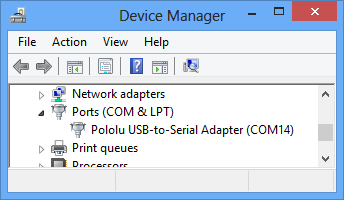 |
Windows 8 device manager showing a Pololu CP2102 device. |
|---|
Some software will not allow connection to higher COM port numbers. If you need to change the COM port number assigned to your USB adapter, you can do so using the Windows device manager. Bring up the properties dialog for the “Pololu USB-to-Serial Adapter” COM port and click the “Advanced…” button in the “Port Settings” tab. From this dialog you can change the COM port assigned to your device.


Home | Forum | Blog | Support | Ordering Information | Lists | Distributors | BIG Order Form | About | Contact
© 2001–2026 Pololu Corporation



