Support »
Pololu Baby Orangutan B User’s Guide
View document on multiple pages.
You can also view this document as a printable PDF.
- 1. Overview
- 2. Contacting Pololu
- 3. Schematic Diagram
- 4. Module Pinout and Component Identification
- 5. Included Header Pins
- 6. Getting Started
- 7. AVR Pin Assignment Table Sorted by Function
- 8. AVR Pin Assignment Table Sorted by Pin
- 9. Motor Driver Truth Table
1. Overview
The Baby Orangutan B-48, B-168, and B-328 robot controllers are complete control solutions for small robots. The small module includes a powerful Atmel ATmega48/168/328P microcontroller, two channels of bidirectional motor control, a user potentiometer, 18 user I/O lines (16 of which can be used as general-purpose digital I/Os and 8 of which can be used as analog input channels) that can be used to expand the system. A battery, motors, and sensors can be connected directly to the module to create simple robots.
Note: This user’s guide applies only to the most recent Baby Orangutan B revision. The older, discontinued Baby Orangutans have green solder masks while the new Baby Orangutan Bs have blue solder masks.
2. Contacting Pololu
You can check the Baby Orangutan B-328 robot controller page for additional information, including pictures, example code, and application notes.
We would be delighted to hear from you about any of your projects and about your experience with the Baby Orangutan Robot controller. You can contact us directly or post on our forum. Tell us what we did well, what we could improve, what you would like to see in the future, or anything else you would like to say!
3. Schematic Diagram
The basic schematic of the Baby Orangutan B is identical to that of the larger Orangutan SV-328 and Orangutan LV-168 robot controllers. You can effectively build your own Orangutan SV-328 by adding a buzzer, LCD, and pushbuttons as indicated in the Orangutan SV-328 schematic. This design means software can be written for one device that will work on the other, provided the Baby Orangutan is given matching hardware connections.
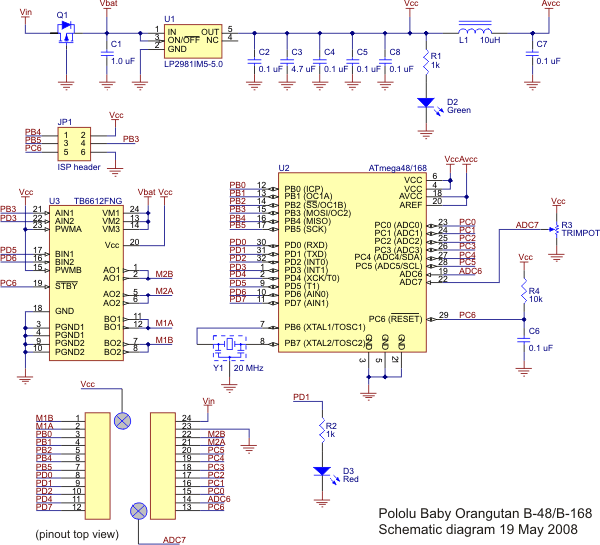 |
Pololu Baby Orangutan B-48/B-168/B-328 schematic diagram. |
|---|
4. Module Pinout and Component Identification
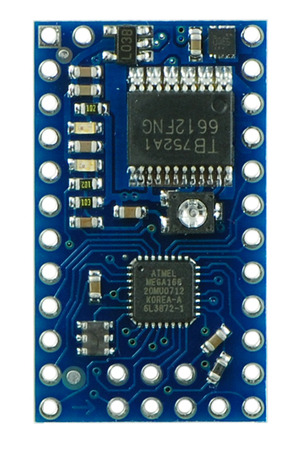
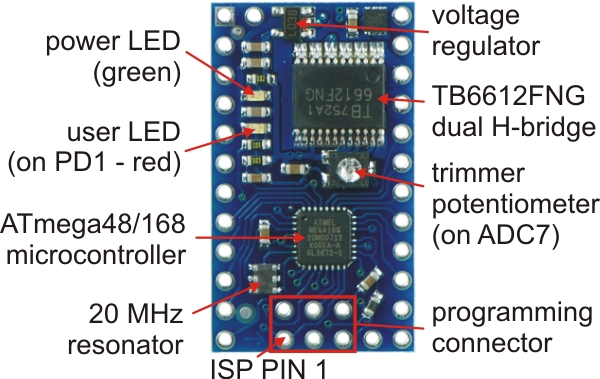
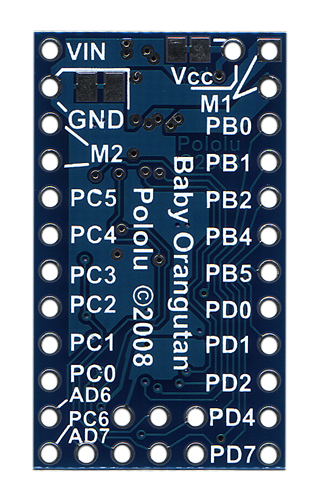
The Baby Orangutan contains a programmable ATmega48, ATmega168, or ATmega328P AVR microcontroller, a TB6612FNG dual H-bridge for direct control of two DC motors, a 10k user trimmer potentiometer (connected to ADC7), a green power LED, a red user LED (connected to PD1), a 20 MHz resonator, and a reverse-battery-protection MOSFET, all containted in a tiny 1.2" x 0.7" 24-pin DIP package. Power pins, one of the motor outputs, and several I/O lines are all accessible from one side to enable use of the Baby Orangutan as a single in-line pin (SIP) package for applications that do not require all of the I/O lines.
|
|
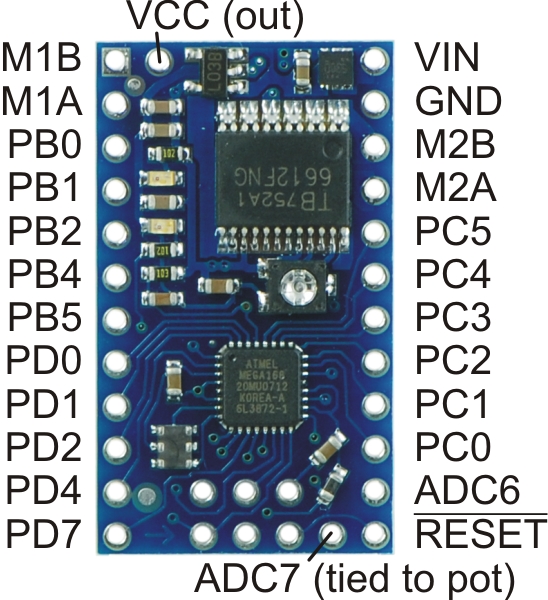
The pinout diagram, combined with a pin assignment table, is also available as a downloadable pdf: Baby Orangutan B pinout and pin assignment table (285k pdf).
- VIN should be from 5 to 13.5 V, with an absolute maximum of 15 V.
- RESET can be brought low to reset the controller, but it can otherwise be left disconnected (it is internally pulled high). This pin is labeled as PC6 in the ATmega48/168/328 datasheet (and on the Baby Orangutan silkscreen).
- Vcc can be used to tap into the Baby Orangutan’s regulated 5V line. This line can supply a total of around 100 mA at 5 V, but thermal dissipation limits the total Vcc current to around 50 mA at 13.5 V. Note that attempting to pull too much current from Vcc could permanently damage the Baby Orangutan’s voltage regulator.
- M1A & M1B are the outputs used to drive motor 1. These outputs can supply around 1 A continuous (3 peak).
- M2A & M2B are the outputs used to drive motor 2. These outputs can supply around 1 A continuous (3 peak).
- PC0 – PC5 can be used as both analog inputs and digital I/O lines
- ADC6 & ADC7 are dedicated analog inputs. Note that ADC7 is internally connected to the 10k user trimmer potentiometer.
- PB0, PB3, PB4, PB5, PD0, PD1, PD2, PD3, PD4, & PD7 are digital I/O lines with alternate functions determined by the AVR hardware peripherals to which they connect. For example, PD0 and PD1 connect to the ATmega48/168’s UART and can be configured to function as RX and TX, respectively. Note that PD1 is internally connected to the red user LED, which may limit its ability to be used as an input (if the source cannot drive the PD1 hard enough, the voltage will be pulled below the AVR’s high threshold by the LED-resistor circuit ).
Warning: Pins PB4 and PB5 are used as ISP programming pins in addition to digital user I/O lines. Be careful not to connect anything to these pins that might interfere with programming (e.g. large capacitance or an external device that could drive those lines during programming). Similarly, don’t connect anything to those lines that might behave unexpectedly when they are driven during programming (e.g. if you use these lines as inputs to a motor driver IC, it could drive your motors in strange and potentially dangerous ways during programming) .
You can tap into the Baby Orangutan’s regulated 5V Vcc line using the pin labeled “Vcc” or either of the two pads on the bottom of the board directly to the left of this pin. You can tap into the Baby Orangutan’s ground using the two pads on the bottom of the board directly to the right of the “GND” pin.
 |
5. Included Header Pins
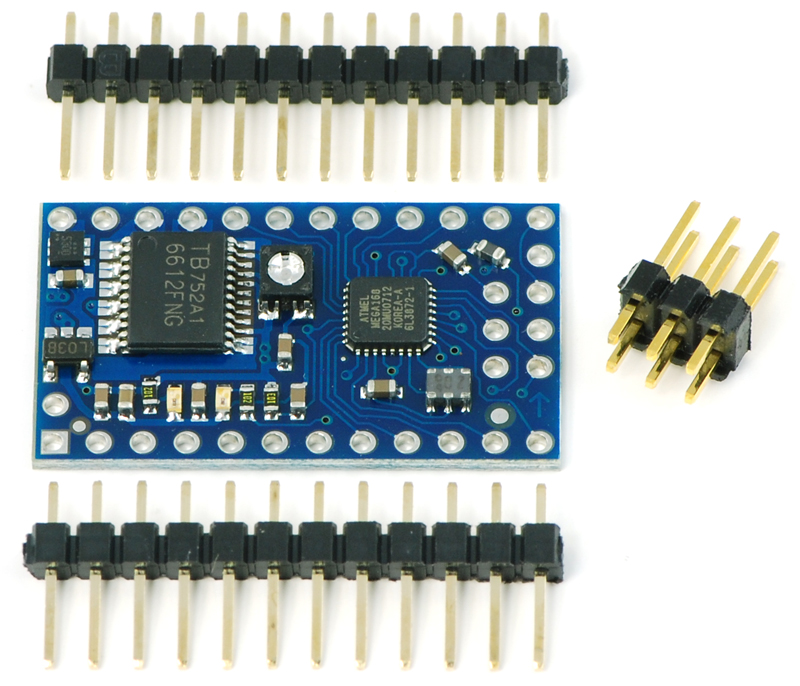
The Baby Orangutan ships with 0.1" header pins as shown in the left picture below: two 12×1 strips and one 3×2 ISP programming header. Both 12×1 strips can be soldered in to allow the module to be used as a DIP component on breadboards or prototyping boards, or a single 12×1 strip can be soldered in to allow the module to be used as a single in-line pin (SIP) component (since power pins, one of the motor outputs, and several I/O lines are all accessible from one side). The header pins can be left off and wires can be directly soldered to the Baby Orangutan for space-constrained installations.
|
|
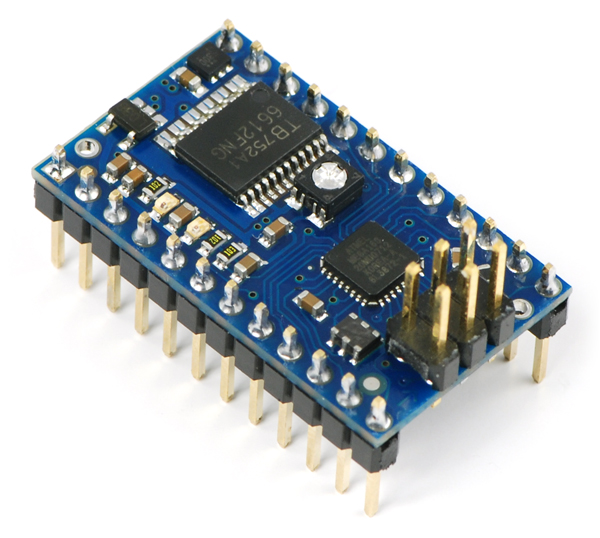
If you solder in the 3×2 ISP header pins, the solder connections should be made along the bottom side of the board so the pin connections are available from the top side of the board, as shown in the right picture above. If you solder the ISP pins to the wrong side of the board, your programmer’s ISP cable will not be able to connect correctly to the Baby Orangutan.
6. Getting Started
The Baby Orangutan is powered via the VIN and GND pins, which are located at the top-right corner of the board. The device is protected by a MOSFET against accidental reverse-battery connection. The supply voltage should be 5 – 13.5 V, with an absolute maximum of 15 V, so a 5- to 9-cell NiCd or NiMH battery pack is a good choice. This Orangutan can work with a 10-cell NiCd or NiMH battery pack or a 12V lead-acid battery, but you should be aware that such a power source might exceed the controller’s maximum voltage rating if the batteries are freshly charged. When the Orangutan is powered, the green power LED is illuminated. The RESET pin can be brought low to reset the controller, but it can otherwise be left disconnected (it is internally pulled high).
Please see the Pololu AVR Programming Quick Start Guide for tutorials on how to get started programming the Baby Orangutan in Windows, Linux, and Mac OS X. That guide also covers the Pololu AVR C/C++ Library and the Pololu USB AVR Programmer.
7. AVR Pin Assignment Table Sorted by Function
| Function | Pin |
|---|---|
| digital I/Os (x16) | PB0, PB1, PB2, PB4, PB5, PC0, PC1, PC2, PC3, PC4, PC5, PD0, PD1, PD2, PD4, PD7 |
| analog inputs (x8) | PC0, PC1, PC2, PC3, PC4, PC5, ADC6, ADC7 |
| motor 1 control (A and B) | PD5 and PD6 |
| motor 2 control (A and B) | PD3 and PB3 |
| red user LED | PD1 |
| user trimmer potentiometer | ADC7 |
| ISP programming lines (x3) | PB3, PB4, PB5 |
| RESET | PC6 |
| UART (RX and TX) | PD0 and PD1 |
| I2C/TWI (SDA and SCL) | PC4 and PC5 |
| SPI | inaccessable to user |
| Timer1 PWM outputs (A and B) | PB1 and PB2 |
8. AVR Pin Assignment Table Sorted by Pin
| Port | Pin | Orangutan Function | Notes/Alternate Functions |
|---|---|---|---|
B |
PB0 | digital I/O | Timer1 input capture (ICP1) divided system clock output (CLK0) |
| PB1 | digital I/O | Timer1 PWM output A (OC1A) | |
| PB2 | digital I/O | Timer1 PWM output B (OC1B) | |
| PB3 | M2 control line | Timer2 PWM output A (OC2A) ISP programming line | |
| PB4 | digital I/O | Caution: also an ISP programming line | |
| PB5 | digital I/O | Caution: also an ISP programming line | |
| PB6 | 20 MHz resonator input | not accessable to the user | |
| PB7 | 20 MHz resonator input | not accessable to the user | |
C |
PC0 | analog input and digital I/O | ADC input channel 0 (ADC0) |
| PC1 | analog input and digital I/O | ADC input channel 1 (ADC1) | |
| PC2 | analog input and digital I/O | ADC input channel 2 (ADC2) | |
| PC3 | analog input and digital I/O | ADC input channel 3 (ADC3) | |
| PC4 | analog input and digital I/O | ADC input channel 4 (ADC4) I2C/TWI input/output data line (SDA) | |
| PC5 | analog input and digital I/O | ADC input channel 5 (ADC5) I2C/TWI clock line (SCL) | |
| PC6 | RESET pin | internally pulled high; active lowdigital I/O disabled by default | |
D |
PD0 | digital I/O | USART input pin (RXD) |
| PD1 | digital I/O | connected to red user LED (high turns LED on) USART output pin (TXD) | |
| PD2 | digital I/O | external interrupt 0 (INT0) | |
| PD3 | M2 control line | Timer2 PWM output B (OC2B) | |
| PD4 | digital I/O | USART external clock input/output (XCK) Timer0 external counter (T0) | |
| PD5 | M1 control line | Timer0 PWM output B (OC0B) | |
| PD6 | M1 control line | Timer0 PWM output A (OC0A) | |
| PD7 | digital I/O | ||
ADC6 | dedicated analog input | ADC input channel 6 (ADC6) | |
ADC7 | dedicated analog input | connected to user trimmer potentiometer ADC input channel 7 (ADC7) | |
This pin assignment table, combined with a pinout diagram, is also available as a downloadable pdf: Baby Orangutan B pinout and pin assignment table (285k pdf).
9. Motor Driver Truth Table
| input | output | motor effect | PD5, PD3 | PD6, PB3 | M1A, M2A | M1B, M2B |
|---|---|---|---|---|
H | H | L | L | brake |
L | H | L | H | “forward” |
H | L | H | L | “reverse” |
L | L | OFF (high-impedance) | coast | |
Motor 1 is controlled by pins PD5 and PD6, and motor 2 is controlled by PD3 and PB3. These pins are connected to the ATmega48/168’s four eight-bit hardware PWM outputs, which allows you to achieve variable motor speeds through hardware timers rather than software. This frees the CPU to perform other tasks while motor speed is automatically maintained.
The suggested procedure for using hardware PWM outputs to control the motors is as follows:
- Make the four motor control pins outputs and drive them high; this drives all four motor outputs low.
- Configure Timer0 and Timer2 to use a prescaler of 8, which results in a PWM frequency of 20 MHz/8/256 = 9.8 kHz. Set these timers for inverted PWM mode output on both OCxA and OCxB, meaning that these PWM pins are set on timer compare match and cleared on timer overflow. This results in negative PWM pulses with duty cycles determined by registers OCR0A, OCR0B, OCR2A, and OCR2B.
- You can command motor 1 to drive “forward” at a speed ranging from 0 – 255 by setting OCR0B = speed and holding fixed OCR0A = 0. You can command motor 1 to drive “reverse” at a speed ranging from 0 – 255 by setting OCR0A = speed and OCR0B = 0. During the period where the two input pins have opposite values, the motor drives at full speed. During the period where the two inputs have the same value (high), the motor brakes. Cycling between drive and brake and high frequency results in variable motor speed that changes as a function of PWM duty cycle. Analogous results can be obtained for motor 2 using OCR2A and OCR2B. (Note that the concept of “forward” is arbitrary as simply flipping the motor leads results in rotation in the opposite direction.)
Using these PWM settings, OCR0B = 255 is equivalent to holding PD5 low while OCR0A = 0 is equivalent to holding PD6 high. As you can see from the truth table above, in this state M1B connects to your battery’s positive terminal and M1A connects to ground. Decreasing OCR0B to something less than 255 decreases the percentage of time PD5 is low, causing M1B to alternate between VIN and GND (and hence causing motor 1 to alternate between drive and brake). Similarly, OCR2B = 255 is equivalent to holding PD3 low while OCR2A = 0 is equivalent to holding PB3 high. In this state, M2B connects to your battery’s positive terminal and M2A connects to ground.


Home | Forum | Blog | Support | Ordering Information | Lists | Distributors | BIG Order Form | About | Contact
© 2001–2026 Pololu Corporation



