Original 3pi Robot »
Pololu 3pi Robot
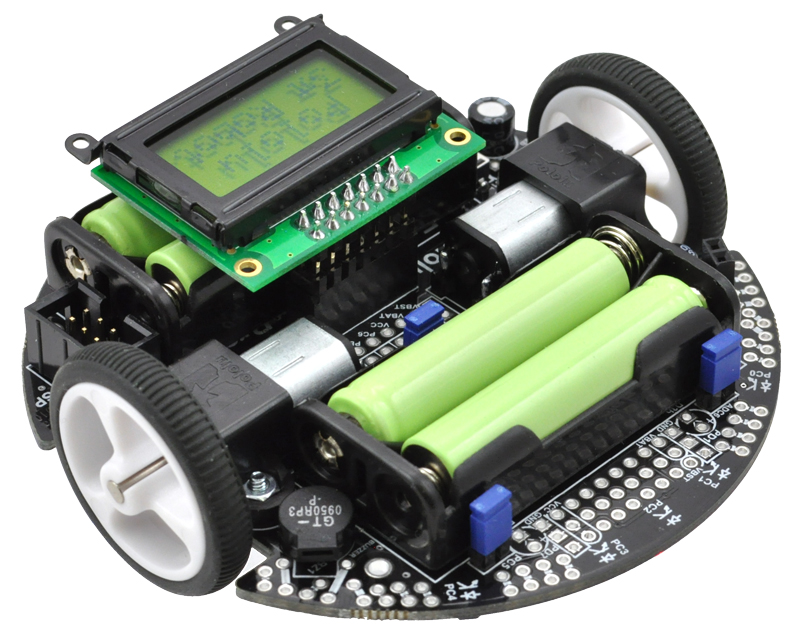
The Pololu 3pi robot is a complete, high-performance mobile platform featuring two micro metal gearmotors, five reflectance sensors, an 8×2 character LCD, a buzzer, and three user pushbuttons, all connected to a C-programmable ATmega328 AVR microcontroller. Capable of speeds exceeding 3 feet per second, 3pi is a great first robot for ambitious beginners and a perfect second robot for those looking to move up from non-programmable or slower beginner robots.

| Description | Specs (10) | Pictures (17) | Resources (29) | FAQs (8) | On the blog (13) | Distributors (0) |
|---|
- How do you pronounce “3pi”, anyway?
- The “pi” in 3pi is pronounced like the greek letter π (e.g. three-pie). The name comes from the size of the robot’s chassis, which is approximately 3pi centimeters (9.4 cm, 3.7"in) in diameter.
- How does the battery charger connection work? Is there a charger included?
- The 3pi robot does not include batteries or a charger. The battery charger connection provides a direct connection to the batteries so that if you use rechargeable batteries, you can recharge them without taking them out of the robot. You will need a charger capable of charging four NiMH or NiCD cells (depending on what you’re using) in series. Such chargers are readily available in hobby stores for charging electric model airplane battery packs. Please note that rechargeable batteries are not required as the 3pi can use regular alkaline cells, but we strongly recommend investing in some NiMH cells and a charger.
- I’m ready to order a 3pi, but am wondering what sort of battery charger I need. Any recommendations?
You will only need a battery charger if you plan on powering your 3pi with rechargeable cells. You want a charger that can work with 4 NiMH cells in series (they are usually in battery packs, not in battery holders like on the 3pi) and can be powered by AC (a wall outlet). In general, having more flexibility (such as the ability to charge 1-8 cells) is nice for future projects. We regularly use the iMAX-B6AC balance charger/discharger for charging batteries here at Pololu.
Chargers like the iMAX-B6AC can be connected to the 3pi’s battery charge port, allowing you to charge the batteries while they are still in the robot.
Since the 3pi just uses ordinary AAA batteries, you can also use AAA chargers (into which you stick the individual cells) available at most general electronics stores. For example, a quick Google search yields:
4 AA & 4 AAA Ni-MH Battery Charger
(Note that we have no experience with this particular charger and are not specifically endorsing it.) The downside to a charger like this is that you have to remove the batteries from the 3pi to charge them.
- The green (PD7) user LED on my 3pi flickers even though I’m not doing anything with it. Is it malfunctioning?
- No, this behavior is normal. To get the most out of the ATmega168’s I/O lines, one of the LCD’s data lines (PD7) doubles as the control line for the green LED, so this LED might flicker when the LCD is updated. As such, the amount of flickering and effective brightness of the LED will generally be a function of the rate at which you are updating the LCD. Note that you can change the state of the green LED without affecting the LCD at all, and using the LCD via the Pololu AVR library will only very briefly change the state of the LED line as needed before restoring it to its previous state.
- Can I augment/customize my 3pi by adding my own electronics/sensors?
Yes. The easiest way to augment your 3pi is through an expansion kit, which can comes either with cutouts that let you see the LCD below or without cutouts. The version without cutouts replaces the LCD, giving you access to more I/O lines and more prototyping space. An expansion kit is not required for addition of your own electronics, however.
The 3pi robot has a limited number of free I/O lines that can be used as inputs for additional sensors or to control additional electronics such as LEDs or servos. Please see section 10.c of the 3pi user’s guide for more information.
- Are wheel encoders included or can they be added to the 3pi robot? Are there sufficient I/O lines available for encoders?
- Unfortunately, there is no provision for encoders on the 3pi: we do not have any sensor solution and the microcontroller does not have enough I/O lines. Therefore, the only way to add encoding is to make your own sensor setup and to use an external microcontroller (for example, on an expansion PCB) to do the sensor reading. The secondary microcontroller can communicate with the main 3pi controller using the asynchronous serial lines, which are available for expansion purposes.
- I’m adding peripherals to the 3pi that require 5 V. How much current can the 5 V (Vcc) power bus supply?
Because the 5 V goes through two power stages, the answer is not completely clear-cut. The 5 V regulator itself has a 900 mW power dissipation limit, so with a 4.3 V drop from the 9.3 V boost voltage to 5 V, we get just over 200 mA. The stock electronics on the 3pi typically use under 50 mA (however, this depends on what your program is doing, if you are making high-frequency noise with the buzzer, and so on), so you could figure an absolute max of 150 mA, with 100 mA being a more comfortable guideline.
However, the boost voltage has a limit of its own of around 1 A, which is dependent on your battery voltage. The motors and IR LEDs also use this supply, so using a lot for your 5 V will affect what is available for the motors. You can almost stall the motors and still have the full boost voltage on the motors in the stock configuration; if you’re also drawing an extra 200 mA for other electronics, the boost voltage will start dropping as the motors approach stall, though this is not necessarily a bad thing since it will limit the stress on the motors and lower the voltage drop on the linear regulator.
- What is the purpose of the small piece of electrical tape stuck on the bottom of the 3pi PCB near the ball caster? Can I remove it?
- The electrical tape provides extra protection for the boost regulator circuit. It is easy to touch this area of the PCB with your finger when pushing the power or reset button, and without the tape your finger can change the boost voltage to levels that are out of spec for components on the board. We do not recommend that you remove it.
Related products


Home | Forum | Blog | Support | Ordering Information | Lists | Distributors | BIG Order Form | About | Contact
© 2001–2026 Pololu Corporation



