Support » Pololu AVR Programming Quick Start Guide » 4. Programming in Linux »
4.4. Compiling an Example Program in Linux
A simple demo program is supplied in the directory libpololu-avr/examples/atmegaXXX/simple-test/, where atmegaXXX is the processor on your board.
Open a terminal window and navigate to this directory. You should be able to compile the example with the supplied Makefile by typing make at the command prompt. This will produce a file named test.hex which is ready to be flashed to your AVR, and the output to your terminal should look something like this:
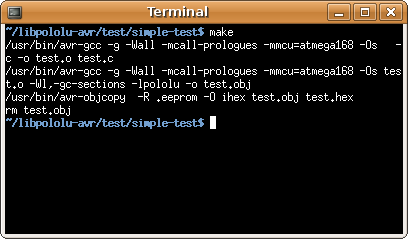 |
Compiling the test program under Linux. |
|---|
If make completed successfully, connect your programmer (or Orangutan SVP) to your computer and your target device, and turn on the target’s power. If you are using the Pololu USB AVR Programmer, the green USB LED should be on, the red LED should be off, and the yellow LED should be blinking, indicating that the programmer is ready. Type make program to load the program onto the Orangutan or 3pi. If your programmer is installed on a port other than /dev/ttyACM0 you will have to edit the Makefile and enter the correct port.
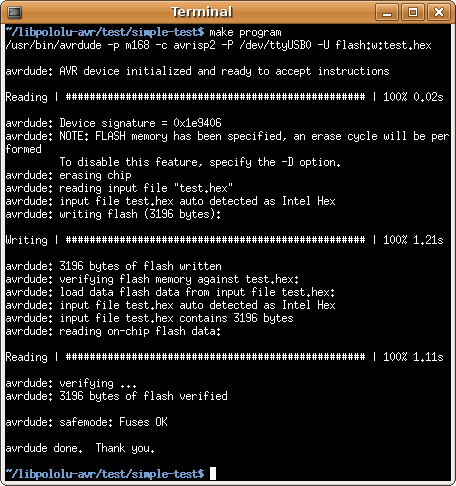 |
Programming the Orangutan with avrdude under Linux. |
|---|
If your controller was successfully programmed and you are not using a Baby Orangutan, you should hear a short tune, see the message “Hello!” on the LCD (if one is present and the contrast is set correctly), and the LEDs on the board should blink. If you are using a Baby Orangutan, you will just see the red user LED blink.
Note for Orangutan SVP and X2 users: AVRDUDE has incorrect chip erase delay settings for the ATmega324P, ATmega644P, ATmega1284P. This means that when you try to program, the erase operation will take longer than AVRDUDE expects and AVRDUDE will interpret this as an error. The workaround is to find the AVRDUDE configuration file, avrdude.conf, and increase the chip erase delay for the m324p/m644p/m1284p to 55000. The file is located in /etc/ in Linux.
Related products


Home | Forum | Blog | Support | Ordering Information | Wish Lists | Distributors | BIG Order Form | About | Contact
© 2001–2024 Pololu Corporation



