Support »
Pololu TReX User’s Guide
View document on multiple pages.
You can also view this document as a printable PDF.
- 1. Overview
- 2. Contacting Pololu
- 3. Getting Started
- 4. RC/Analog in Detail
- 5. The Serial Interface
- 6. Updating the TReX's Firmware
1. Overview
The TReX Dual-Motor Controller is a versatile DC motor controller designed to seamlessly blend autonomous and human control of small- and medium-sized robots. The TReX can control two bidirectional and one unidirectional motor via three independent control interfaces: radio control (RC) servo pulses, analog voltage, and asynchronous serial (RS-232 or TTL). It uses five input channels to receive the RC or analog control signals. When operating in RC or analog mode, the five channels function as follows:
- Channel 1: motor 1 speed and direction or, if in mix mode, turn left/right
- Channel 2: motor 2 speed and direction or, if in mix mode, go forward/reverse
- Channel 3: auxiliary (unidirectional) motor speed
- Channel 4: can be used to enable “flipped mode”, which allows invertible robots to be controlled as normal when they are inverted
- Channel 5: determines whether the motors are controlled by the channel inputs or the serial interface; this channel allows you to switch between autonomous and human control at will
The serial interface can switch instantly with one of the other two interfaces, allowing mixed autonomous and remote control. For example, a robot could be configured to run autonomously most of the time, but a human operator could override the autonomous function if the robot gets stuck or into a dangerous situation. If the serial mode is selected as the primary interface, high-resolution measurements of all five channel input signals (be they RC pulses or analog voltages) are made available to the autonomous robot controller, allowing for complex and unlimited mixing of operator control and sensor input. For example, the TReX would be a great motor controller for a line-following robot whose overall speed is controlled by an RC throttle, or an RC car with sensors that autonomously dodges obstacles in its path as you drive it around.
2. Contacting Pololu
You can check the TReX motor controller page for additional information. We would be delighted to hear from you about any of your projects and about your experience with the TReX motor controller. You can contact us directly or post on our forum. Tell us what we did well, what we could improve, what you would like to see in the future, or anything else you would like to say!
3. Getting Started
 |
TReX input/output connection points |
|---|
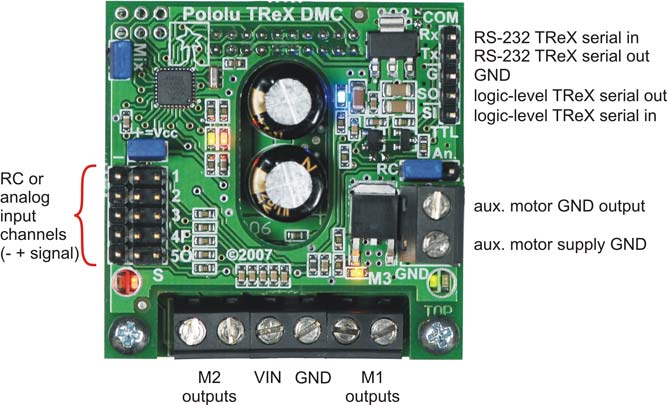
Getting started with your TReX can be as simple as connecting power, your motors, and your RC or analog control signals (see Section 3.a and Section 3.b). Configure your jumpers for RC or analog mode (see Section 3.c) and you’re good to go. While it’s running, the TReX will communicate with you via its LEDs (see Section 3.d). Once you have all your connections in place, we recommend your first step be to calibrate your TReX for your particular RC or analog controller (see Section 3.e).
3.a. Motor and Power Connections
The TReX receives its power through the VIN/GND connector terminals. VIN should be between 6 and 16 V and your power source must be able to supply the current your motors will be drawing. The TReX can supply peaks of 30 A and up to a continuous 13 A to each of its two bidirectional motors under typical conditions. Performance will depend on the actual system and its ability to dissipate heat. The TReX’s bottom motor driver board is designed to help heat flow away from the VNH2SP30 motor driver chips, but addition of a heat sink and good air flow can further improve performance. The TReX can supply up to 15 A (continuous) to the auxiliary motor.
There are several different ways to connect motors to your TReX:
Option 1:
 |
TReX motor connections (single battery) |
|---|
The figure above demonstrates how to connect two bidirectional motors and a unidirectional auxiliary motor to your TReX, all powered by the same battery. Note that the auxiliary motor is driven by permanently connecting one lead to power while the board PWMs the other lead between high impedance and ground. You must connect your battery’s ground directly to the lower port of the auxiliary motor’s connection block if you plan to use the auxiliary motor. Otherwise, the auxiliary motor could attempt to pull too much current through the TReX itself, thereby damaging the unit.
The auxiliary motor’s other lead connects to the upper port of its connection block. You will need to connect a diode across the auxiliary motor’s terminals as shown below. Failing to do so will adversely affect the performance of your TReX and could result in permanent damage to the device. Take great care to ensure you do not solder the diode in backwards! You should not solder a diode to your bidirectional motors.
You may find it beneficial to solder 0.1uF capacitors across all of your motors’ terminals. This will decrease the noise put out by your motors and can improve performance of your TReX. You can further decrease the noise put out by your motors by keeping their leads as short as possible and twisting them around each other in a helix.
Option 2:
 |
TReX motor connections (separate battery for the auxiliary motor) |
|---|
It is possible to power the auxiliary motor with a second, separate 0 – 24 V battery, as shown above. To do so, connect that battery’s ground to the lower of the two auxiliary motor connection block ports. Connect one of your auxiliary motor’s leads to the upper connection block port and connect the other of your motor’s leads directly to the battery’s positive side. You will still need to solder a diode across your auxiliary motor’s terminals.
Option 3:
 |
TReX joint-motor connection |
|---|
Lastly, you can use both motor 1 and 2 outputs to control a single, more powerful (up to 25 A continuous) bidirectional motor by connecting it as shown above. One of the motor’s terminals connects to both of motor 1’s outputs while the other of the motor’s terminals connects to both of motor 2’s outputs. In order to use your TReX in this way, you must use the serial interface to set the TReX to “joint motor mode”. In this mode, the single bidirectional motor is considered “motor 1”. The motor speed/direction indicator LEDs will not work in this mode, nor will current sensing or channel mixing. Although it is not shown in the figure above, you can additionally control an auxiliary motor while running in “joint motor mode”.
3.b. Signal Connections
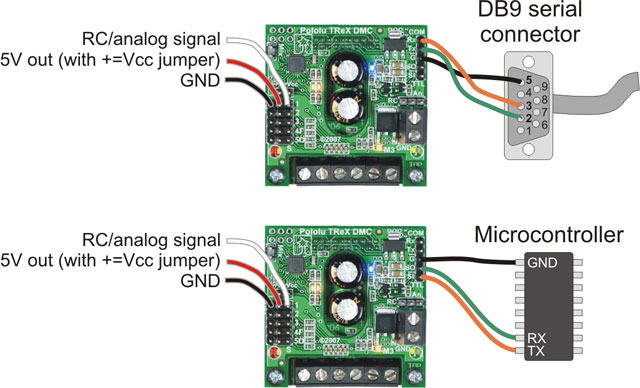
RC/analog signals should connect to the interior of the three channel columns, which are located on the left side of the board; this connection is represented by the white wire in the figure below.
The middle column is connected to the TReX’s regulated power (Vcc) through the “+=Vcc” (BEC) jumper and will provide 5 V to your RC receiver or analog controller when this jumper is in place. This connection is represented by the red wire in the figure below. If you want to power your RC receiver or analog controller from a source other than the TReX, make sure you remove the BEC jumper.
Warning: This middle Vcc column is tied to the output of a linear voltage regulator, so current output is limited by thermal dissipation. The regulator will only be able to safely supply a maximum of 100 mA when VIN is 16 V (it has a 1-W power dissipation rating). This is typically sufficient for powering an analog joystick or RC receiver, but it is insufficient for powering servos. If you want to connect servos to some of your RC receiver channels, you must power your RC receiver separately and disconnect the BEC jumper. Attempting to use the TReX’s regulated Vcc line to power servos can permanently damage the TReX.
The exterior column is ground and is represented by the black wire in the figure below. Your input source and the TReX must share a common ground, even if you are powering your input source from something other than the TReX. You only need to make a single ground connection.
 |
TReX RC/serial input signal connections |
|---|
In addition to RC/analog connections, you can connect the TReX to either an RS-232 (COM) or logic-level (TTL) serial port. Note that you should not simultaneously have both RS-232 and TTL connected. The figure above depicts the two possible serial connections. The serial pins are labeled from the perspective of the TReX, meaning you should connect the TReX’s TX or SO line to your target’s receive line (the green wire in the figure above); your TReX’s RX or SI line should connect to your target’s transmit line (the orange wire in the figure above). On a DB9 connector, pin 2 is your computer’s receive line and pin 3 is your computer’s transmit line.
Warning: It is very important that you do not connect your TReX’s TTL pins (SO and SI) to an RS-232 port. RS-232 serial communication signals range from -12 to +12 V, which is well outside the 0 – 5 V expected on those lines. Only the COM pins (TX and RX) are designed to handle RS-232 voltages.
3.c. Jumper Settings
The TReX comes with four blue shorting blocks as shown in the picture below. These jumpers let you affect some aspects of its behavior without serial configuration commands. Note that we recommend you always power off your TReX before changing jumpers (other than the mix jumper, which can be changed at any time). This is not strictly necessary, but it is the safest practice.
 |
TReX jumpers |
|---|
- Channel-Mix (a.k.a. Single-Stick) Jumper: When this jumper is in place, the TReX operates in single-stick mode. Channel 1 is treated as turn left/right while channel 2 is treated as forward/reverse. When this jumper is off, channel 1 directly controls motor 1 and channel 2 directly controls motor 2. This jumper may be added or removed on the fly.
- Battery Elimination Circuit (BEC, a.k.a. +=Vcc) Jumper: When this jumper is in place, the middle column of channel input pins is connected to Vcc (5 V). You can use this jumper to power your RC receiver or analog controller through your TReX. If your RC receiver is powered via another source, you must leave this jumper off.
Warning: The Vcc column is tied to the output of a linear voltage regulator, so its current output is limited by thermal dissipation. The regulator will only be able to safely supply a maximum of 100 mA when VIN is 16 V (it has a 1-W power dissipation rating). This is typically sufficient for powering an analog joystick or RC receiver, but it is insufficient for powering servos. If you want to connect servos to some of your RC receiver channels, you must power your RC receiver separately and disconnect the BEC jumper. Attempting to use the TReX’s regulated Vcc line to power servos can permanently damage the TReX.
- Mode-Select Jumper: This jumper specifies the interface that is in control of the TReX. When it shorts the left two pins (as shown in the jumper image above), the TReX is in RC mode, which means the TReX is expecting RC pulse inputs on its five input channels and that these RC signals will determine the motor outputs. When the jumper shorts the right two mode pins, the TReX is in analog mode; the TReX measures the analog voltages on the five input channels and sets the motor outputs accordingly. When there is no jumper on the three mode pins, the TReX is in serial mode and the serial interface controls the motors. The control interface is determined by the location of the mode jumper when the TReX is first powered up. Changing the location of the mode jumper while the TReX is running will have no effect.
- Learning-Mode/Firmware-Upgrade Jumper: The TReX can automatically calibrate itself for your RC or analog controller by learning the neutral and extreme values for each channel you use. It also has the ability to upgrade its firmware. When placed across the SO and G pins, this jumper puts the TReX into learning/firmware-upgrade mode via the “secret handshake” (see Section 3.e). The TReX ships with this jumper in place since we recommend your first step be to calibrate for your controller. This jumper should be removed before you begin normal operation.
Warning: You should never add this jumper while the board is powered! Disconnect power from the board, add this jumper, and then reconnect power.
3.d. LED Feedback
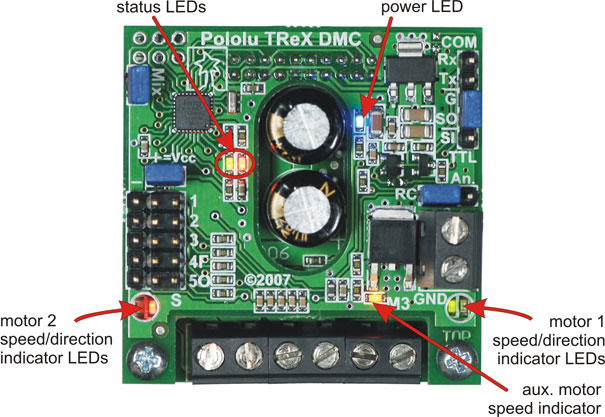
This section explains the meanings of the various illumination patterns of the TReX’s LEDs. The TReX has eight colored LEDs as shown below:
 |
TReX LEDs |
|---|
- Power LED (1): The blue power LED is located on the top board. When it is brightly illuminated, the TReX is receiving power and is running. Note that the power LED can occasionally glow dimly when the TReX is unpowered if it is connected serially to a powered device.
- Motor LEDs (5): Motors 1 and 2 each have two indicator LEDs—one red, one green—tied directly to the motor outputs. These LEDs are located on the bottom (motor-driver) board and can be viewed through holes in the top board. For a given motor, the color of the illuminated LED indicates its direction and the intensity indicates its speed. Our convention is to consider the direction indicated by the green LED “forward” and the direction indicated by the red LED “reverse”. The auxiliary motor output is directly tied to the yellow LED on the lower edge of the top (control) board near the auxiliary motor port; the intensity of this LED indicates the auxiliary motor speed.
- Status LEDs (2):
The TReX has two status LEDs—one red and one green—located on the left side of the top board. These LEDs are used to communicate a great deal of information to the user. The illumination patterns mean different things depending on the TReX’s state.
- On TReX Startup:
- Status LEDs flash rapidly five times: When the TReX starts up, it signals which channels it has learned by flashing its status LEDs five times. A green flash indicates the corresponding channel has been learned; a red flash indicates the corresponding channel has not been learned. For example, a flash sequence of “red, red, green, red, green” means only channels 3 and 5 have been learned. If the TReX is in analog mode, it signals which analog channels have been learned; if it is in RC mode, it signals which RC channels have been learned; if it is in serial mode, the learned-channel signals are for the mode selected by the “channel input source” parameter (this parameter’s default value is RC mode).
- Red and green LEDs blink in unison around once per second: The TReX is waiting to see if it should enter learning mode. This happens when the TReX is in RC or analog mode, the mix jumper is in place, and the serial out (SO) pin is grounded. This last condition can arise if the TReX is connected serially to an unpowered microcontroller. Ungrounding the SO pin will cause the TReX to startup as normal; removing the mix jumper will put the TReX into learning-mode, at which point it will either start trying to learn the channels or will wait for a valid signal on the input lines. If it waits, it will flash the red and green LEDs in unison four times faster while waiting.
- Red and green LEDs alternate around once per second: The TReX is waiting to see if it should enter firmware-upgrade mode. This happens when the TReX is in serial mode (i.e. there is no mode jumper in place), the mix jumper is in place, and the serial out (SO) pin is grounded. This last condition can arise if the TReX is connected serially to an unpowered microcontroller. Ungrounding the SO pin will cause the TReX to startup as normal; removing the mix jumper will put the TReX into firmware-upgrade mode, which will cause the red and green LEDs to start alternating four times faster.
- While Running Normally:
- Red LED on solid, green LED might flicker: The red LED solidly on indicates that serial is in control of the motors (i.e. serial override is active or the TReX is in serial mode). While serial is in control of the motors, the green LED acts as a serial-packet-received indicator. It lights when a command byte is received and stays lit until the last byte of the command packet is received. The flicker rate of the green LED will depend on the baud rate you’re using and the rate at which you’re sending serial commands to the TReX.
- Green LED on solid, red LED might flicker: The green LED solidly on indicates that the channel inputs are in control of the motors (i.e. the TReX is in RC or analog mode and serial override is not active). While the channel inputs are in control of the motors, the red LED acts as a serial-packet-received indicator. It lights when a command byte is received and stays lit until the last byte of the command packet is received. The flicker rate of the red LED will depend on the baud rate you’re using and the rate at which you’re sending serial commands to the TReX.
- Green LED is rapidly flashing, red LED might flicker: The TReX will not let the channel inputs start controlling the motors until safe-start conditions are first met (see Section 4.e). Specifically, it is waiting for a valid signal on all required channels, for the motor signals to request no motor movement, and for the serial override signal to not be requesting serial override mode. This state occurs when the TReX first starts running in RC or analog mode, and can be retriggered if an RC signal is ever lost on a required channel. This state will never occur if the TReX is in serial mode. While in this state, the red LED acts as a serial-packet-received indicator as described in the bullet point above.
- While in Learning Mode (see Section 3.e):
- Red and green LEDs blinking rapidly in unison: The TReX is in RC mode and it is waiting for a valid RC signal on at least one channel before it begins learning the channel calibration values.
- Red LED on solid, green LED off: This is the first stage of the learning sequence in which the TReX is attempting to learn the neutral values of each channel. This phase should last around two seconds. Do not touch the RC/analog sticks while the red LED is on or you could cause learning to fail.
- Status LEDs flash rapidly five times: When the TReX is through learning the neutral values, it will flash the status LEDs five times to indicate which channels had neutrals successfully learned and which channels failed neutral learning. A green flash indicates success for the corresponding channel; a red flash indicates failure. If all five channels fail to learn neutral values, the learning process stops, otherwise it continues to the next phase, which is learning the values of the extremes. Once this last learning phase is complete, the status LEDs will again flash five times to indicate whether the corresponding channel was successfully learned. This final five-flash sequence will repeat until the TReX is reset.
- Red and green LEDs both on solid: This is the second and final stage of the learning sequence in which the TReX is attempting to learn the maximum and minimum values for each channel. This phase lasts around ten seconds, during which time you should move the control sticks to their extremes. Make sure to hold each channel at each extreme for at least 0.5 seconds.
- While in Firmware-Upgrade Mode (see Section 6):
- Red and green LEDs alternate around once per second: The TReX is waiting to see if it should enter firmware-upgrade mode. This happens when the TReX is in serial mode (i.e. there is no mode jumper in place), the mix jumper is in place, and the serial out (SO) pin is grounded. This last condition can arise if the TReX is connected serially to an unpowered microcontroller. Ungrounding the SO pin will cause the TReX to startup as normal; removing the mix jumper will put the TReX into firmware-upgrade mode, which will cause the red and green LEDs to start alternating four times faster.
- Red and green LEDs alternate around four times per second: The TReX is in firmware-upgrade mode and is waiting for the short between the serial out (SO) pin and ground to be removed.
- Green LED flashes briefly once per second: The TReX is in firmware-upgrade mode and is waiting for the correct initial serial input sequence. The TReX enters this state when the short between the serial out (SO) pin and ground is removed after the mix jumper has been removed.
- Red LED flashes: There was a faulty input to the bootloader that has caused the bootloader to revert to waiting for the correct initial serial input sequence. Note: once the firmware upload is complete, the TReX will reboot and the red LED may flash as part of the startup sequence. This is not an indication of a firmware-update error. See the firmware-update section for further details.
- Green LED rapidly flashes: Everything is proceeding as expected during the firmware upgrade process. Each successfully uploaded data packet causes the green LED to flash.
- On TReX Startup:
3.e. Automatic Calibration for Your RC/Analog Controller
The TReX has the ability to automatically calibrate itself for your particular RC or analog controller. We strongly recommend you use this feature to calibrate your TReX as it can result in a substantial increase in performance. You only need to perform the calibration once, but you should recalibrate if you ever change controllers. The TReX can simultaneously store a set of analog calibration values and a set of RC calibration values; the calibration values used depends on the mode of operation (or on the value of the “channel input source” parameter if the TReX is running in serial mode).
The TReX calibrates itself by first learning the neutral values of all the channels and then learning the extremes. You can enter learning mode via the secret handshake:
- Power off your TReX.
- Connect your RC receiver or analog controller to your TReX’s channel inputs.
- Turn on your RC transmitter/analog controller. Set the sticks to the positions you would like to consider “neutral” and, if desired, zero your trim settings.
- Attach the channel-mix jumper.
- Attach the learning-mode jumper (i.e. short the serial out pin, SO, to ground, G). You must never attach this jumper while the board is powered!
- Place the mode jumper to select for either RC or analog (whichever type of controller you’re trying to calibrate for).
- Restore power to your TReX. You should see the red and green status LEDs blinking in unison around once per second.
- Remove the channel-mix jumper. If you now see the red and green status LEDs blinking together around four times per second, the TReX is unable to detect a valid RC pulse signal on any of its input channels. If instead you see the red LED turn on solid, you are now in learning mode, which proceeds in the following four phases:
Learning mode phase 1: learning neutrals
While the red LED is on solid, the TReX is attempting to learn the neutral values of all five channels. Do NOT move the control sticks at all while the red LED is on. It should only take around two seconds for this first phase, though it could be much shorter if the TReX encounters problems learning the neutrals for all five channels. If any RC pulse errors occur during the learning process or if the channel variance is too large, the TReX will not learn the channel.
Learning mode phase 2: neutral learning report
Once phase one is through, the TReX will flash its status LEDs five times to indicate neutral-learning success or failure for each channel. A green flash means that the neutral value was successfully learned for the corresponding channel. A red flash means there was a problem and that channel will not be learned. For example, a flash pattern of “red, red, green, red, green” means that neutrals were learned successfully for channels 3 and 5; channels 1, 2, and 4 will not be learned. If all five flashes are red, the learning process terminates here.
Learning mode phase 3: learning the extremes
This phase begins when both the red and green status LEDs light simultaneously and lasts approximately ten seconds. During this time, the TReX is attempting to determine the maximum and minimum values for each of the five channels. You should try to hold each channel at each of its two extremes for at least half a second. Move the control sticks around slowly and steadily. If you jerk them around very rapidly the TReX may reject the channel inputs as unreliable. If any RC pulse errors occur or if the channel variance isn’t large enough, the TReX will not learn the channel.
Learning mode phase 4: final learning report
This phase is identical to phase 2, except here the green flashes represent channels that were fully learned. The flashing pattern will repeat until the TReX is reset. Now every time the TReX starts up, it will quickly flash the LEDs in this pattern to indicate which channels are calibrated and which are not.
Note: Once learning is complete, you should remove the learning-mode jumper and reset your TReX.
4. RC/Analog in Detail
This section provides a detailed overview of the RC and analog modes of operation. It explains how the TReX processes its channel inputs and how those inputs influence the TReX when it’s in RC or analog mode.
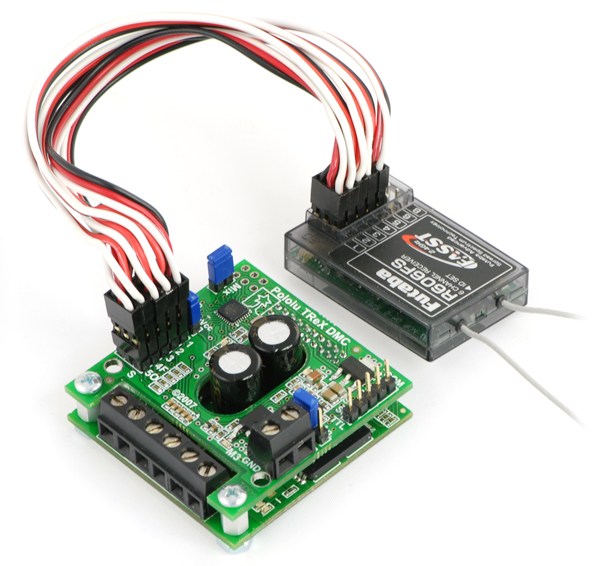 |
Pololu TReX connected to an RC receiver |
|---|
4.a. Channel Functions
The five input channels along the left side of the TReX accept either radio-controlled (RC) servo pulses or analog voltages, depending on the position of the mode-selection jumper (or on the value of the “channel input source” parameter if the TReX is in serial mode). When not in serial mode, the TReX acts on the five channels as follows:
- Channel 1: If mix jumper is in place, turn left/right at the specified speed; if mix jumper is off, set motor 1 direction and speed.
- Channel 2: If mix jumper is in place, go forward/reverse at the specified speed; if mix jumper is off, set motor 2 direction and speed.
- Channel 3: Set auxiliary motor speed (aux. motor is unidirectional).
- Channel 4: Enable/disable flipped mode. Flipped mode causes the TReX to treat motor 1 as motor 2 (and vice versa), and to swap its notions of forward and reverse for each motor. The result is that a differential-drive robot will behave as normal when inverted if flipped mode is enabled. This channel acts like a switch that gets flipped when the channel value falls below a certain threshold. If your controller is not calibrated, this channel may not function as intended.
- Channel 5: Enable/disable serial override. Serial override gives serial control of the motors for as long as channel 5 enables it. When serial override is first enabled, each motor is set based on its most recently received motor command, even if that command occurred while serial override was disabled. Channels 1, 2, and 3 will not affect the motors while serial override is active (unless your serial control source is reading the values of those channels and issuing its commands based in part on them). This channel acts like a switch that gets flipped when the channel value falls below a certain threshold. If your controller is not calibrated, this channel may not function as intended.
4.b. Channel Calibration
As was covered in Section 3.e, you can automatically calibrate your TReX for your RC or analog controller. If this doesn’t prove sufficient for your needs, you can manually calibrate your TReX for your controller by specifying the minimum, neutral, maximum, and deadband values for each channel. The TReX can simultaneously store both a set of RC and a set of analog calibration parameters. The calibration parameters are in the units of the raw channel values: 0.4 us for RC, 4.89 mV for analog. In general, these parameters affect how the TReX interprets the channel input values.
Perhaps most noticeably, these parameters help determine how the channel inputs affect the motors. Motor speed is scaled linearly (or parabolically, if the channel is set as parabolic using the “parabolic channels” configuration parameter) from 0 at a channel input of neutral+deadband to max speed at a channel input of maximum. In the other direction, motor speed goes from 0 at neutral-deadband to max speed at minimum. Motor speed is 0 for channel inputs between neutral-deadband and neutral+deadband, and motor speed is at a maximum for channel inputs greater than maximum or less than minimum. Motor direction is determined by the side of neutral the channel input is on, and notions of forward and reverse can be switched on a channel by channel basis using the “reversed channels” configuration parameter.
4.c. General RC Information
When the channel inputs are RC servo pulses, the update rate of the channel values is determined by the pulse-train frequency of your RC receiver. Typically this is 50 Hz (each channel updates every 20 ms). The TReX can handle channel pulse-train frequencies of 10 Hz to 125 Hz.
The TReX measures the width of RC servo pulses with 12-bit resolution and an accuracy of 1 us. The raw channel value is provided as a 12-bit number in units of 0.4 us, so a raw channel value of 2500 can be physically interpreted as a pulse width of 2500×0.4 =1500 us. Servo pulse widths typically range from 1 ms to 2 ms, with a neutral value of 1.5 ms. This would correspond to raw channel values of 2500, 5000, and 3750, respectively. The TReX can handle pulse widths as short as 0.5 ms (raw channel value 1250) and as long as 2.5 ms (raw channel value 6250). If a channel reading is considered to be an error, the raw channel value will be 0xFFFF (65535 in decimal). Errors result from pulse widths outside the acceptable range and from pulse trains with frequencies outside of the acceptable range. If a signal ceases on a channel, that channels value will stop updating until approximately 150 ms elapse, at which point the channel’s raw value will become 0xFFFF. It will remain as such until valid signals are once again detected on the line.
As a safety feature, you can designate channels as required using the “required channels” configuration parameter. If a required channel goes for more than 500 ms without receiving a valid RC servo pulse and the TReX is in RC mode, the TReX will enter safe-start mode (see Section 4.e). By default, the TReX only requires channel one.
If you are not using all five channels, you can optionally ignore unused channels via the “ignored channels” configuration parameter. Ignored channels are treated as fixed at their neutral values (no matter what signals their lines receive).
4.d. General Analog Information
When the channel inputs are analog voltages, the update rate of the channel values is approximately 50 Hz (each channel updates every 20 ms or so). Each channel’s value is the result of a 16-sample average of analog-to-digital conversions.
The TReX measures analog voltages with 10-bit resolution. The raw channel value is provided as a number ranging from 0 to 1023, where 0 corresponds 0 V and 1023 corresponds to 5 V. Your channel source can be as simple as the output of a potentiometer whose inputs are the channel’s associated power (make sure the BEC jumper is in place) and ground connections.
Unlike with RC signals, the TReX has no way of telling if a channel is receiving a valid analog signal. A disconnected channel will still produce a result when run through the analog-to-digital converter. This poses two potential problems:
- If your analog signal source gets disconnected from your TReX, the TReX could drive the motors in unexpected and potentially dangerous ways. Because of this, please be very careful when operating the TReX in analog mode.
- Unused channels can impact behavior of the TReX in undesirable ways. You may not plan on using the flip or override channels, but leaving them disconnected could result in their floating to a value that would enable flipped mode or serial override. One solution to this problem is to use the “ignored channels” configuration parameter to set unused analog channels as ignored. The TReX considers ignored channels to be fixed at their neutral positions. An alternate, purely hardware-based solution would be to short any unused motor channels to a used one and to tie any unused “enable” channels (4 or 5) to Vcc (the 5-volt line). By shorting unused motor channels to a used one, you should be able to get past the safe-start portion of the TReX’s start-up routine.
4.e. Safe-Start Mode
When the TReX starts up in either RC or analog mode, it first enters safe-start mode. In this mode, the three motors are shut down and are unaffected by the channel inputs. The TReX lets you know its in this mode by rapidly flashing its green status LED. To exit this mode, the following conditions must all be simultaneously met:
- All required channels must have a valid signal. This only applies when the TReX is in RC mode since it’s not possible to have an invalid analog signal. Required channels are determined by the “required channels” configuration parameter. Only channel one is required by default.
- All motor channels must be close to their neutral values (i.e. they must not be instructing the motors to move very quickly). Channel 5 must be disabling serial override. The TReX will not allow you to start with serial controlling the motors if you’re in RC or analog mode.
If you have floating channels while running in analog mode, it may be impossible for you to satisfy the safe-start conditions. Bullet point #2 in the analog section (Section 4.d) provides several ways to fix this problem.
Once you have satisfied the safe-start conditions, the green status LED should stop flashing and turn solidly on. This indicates that the channel inputs are now in control of the motors.
5. The Serial Interface
You can use the serial interface for four general purposes: querying the TReX for information (any mode), setting its configuration parameters (serial mode only), sending it motor commands (any mode), and upgrading its firmware (must be in firmware-upgrade mode). Firmware upgrading is addressed in Section 6.
Serial motor commands are accepted in any mode, but they will only immediately affect the motors if the TReX is in serial mode or channel 5 has serial override active. When the TReX is in RC or analog mode and serial override is not active, the most recently received serial motor command for each motor is buffered. These buffered motor commands take effect if serial override becomes active.
Note that when you are using the serial interface, it is crucial that you do not transmit to the TReX while it is transmitting to you. Because of the way the RS-232 circuit is tied to the logic-level serial lines, the TReX can sometimes get its transmissions echoed back to itself. It deals with this by ignoring its receive line while it is transmitting, so anything you send it during this time will be lost. As a consequence, the TReX will never transmit anything over the serial line without your first explicitly asking it to. The high-level protocol for sending commands that cause the TReX to transmit data back to you should be as follows:
- Transmit command packet that causes the TReX to send data back to you
- Wait for all the expected data to be received or for a reasonable timeout period
- Transmit your next command packet
Motor commands are strictly one-way; the TReX will not send data back in response to these. All other commands result in two-way data transfer.
An additional consequence of the RS-232 circuit is everything you send to the TReX using the RS-232 connection will be echoed back to you as you’re transmitting it (RS-232 transmit and receive lines are physically tied together by a resistor). If you are connecting your TReX to a COM port, you can either disable your receiver while you transmit or you can simply discard the echoed bytes you know to expect. The command packet echo will always arrive before any data the TReX sends to you. Note that you will receive no echo if you use the logic level (TTL) serial lines to communicate with the TReX.
5.a. Serial Communication Settings
Unlike our other Pololu serial controllers, the TReX does not support automatic baud detection. Instead, you can configure the TReX to run at one of 11 common baud rates ranging from 1200 to 115,200 bits per second. The TReX ships with a default baud rate of 19,200 bps.
The TReX allows you to optionally select one of three different kinds of error detection to help you ensure the integrity of your communications: even parity, odd parity, or 7-bit cyclic redundancy checking (CRC-7). Cyclic redundancy checking is explained in more detail in Section 5.e. The default setting is no error detection.
Lastly, you can specify whether serial communication with the TReX will use one or two stop bits. The default setting is one stop bit.
These serial settings are controlled by a single “serial-settings” configuration parameter (see Section 5.d for more information).
5.b. Serial Command Protocols
The TReX serial command protocol is fairly straightforward. Communication is achieved by sending command packets consisting of a single command byte followed by any data bytes that command requires. Command bytes always have their most significant bits set (i.e. range from 128 – 255) while data bytes always have their most significant bits cleared (i.e. range from 0 – 127). This means that each data byte can only transmit seven bits of information.
One significant improvement over other Pololu serial controllers is the TReX’s ability to gracefully handle serial errors (such as bad commands, incorrectly formatted commands, or even hardware-level serial errors). The TReX has a configuration parameter that, if set, will shut down the motors if a serial error occurs, but the TReX itself will continue running and accepting commands. This is a safety precaution taken in case the serial error occurred during a command that was intended to stop the motors.
The TReX will respond to two sub-protocols:
Compact Protocol:
This is the simpler and more compact of the two protocols; it is the protocol you should use if your TReX is the only device connected to your serial line. The TReX Compact protocol command packet is simply:
command byte (with MSB set), any necessary data bytes
For example, if we want to set the auxiliary motor (command 0xF0) to full speed (127) using the Compact protocol, we would send the following byte sequence:
in hex: 0xF0, 0x7F
in decimal: 240, 127
Pololu Protocol:
This protocol is compatible with the serial protocol used by our other serial motor and servo controllers. As such, you can daisy-chain a TReX on a single serial line along with our other serial controllers (including additional TReXes) and, using this protocol, send commands specifically to the desired TReX without confusing the other devices on the line.
The Pololu protocol is to transmit 128 (0x80 in hex) as the first (command) byte, followed by a device-number data byte. The default device number for the TReX is 7, but this is a configuration parameter you can change. Any Pololu device on the line whose device number matches the specified device number will accept the command that follows; all other Pololu devices will ignore the command. The remaining bytes in the command packet are the same as the Compact protocol command packet you would send, with one key difference: the Compact protocol command byte is now a data byte for the command 128 and hence must have its most significant bit cleared. Therefore, the command packet is:
0x80, device # byte, command byte with MSB cleared, any necessary data bytes
For example, if we want to set the auxiliary motor (command 0xF0) to full speed (127) for a TReX with device number 7, we would send the following byte sequence:
in hex: 0x80, 0x07, 0x70, 0x7F
in decimal: 128, 7, 112, 127
Note that 0x70 is the command 0xF0 with its most significant bit cleared.
The TReX will respond to both the Pololu and Compact protocols on the fly; you do not need to use a jumper or configuration parameter to identify which protocol you will be using.
5.c. Serial Command List and Documentation
The TReX command documentation (100k pdf) contains a list of all the serial commands the TReX recognizes along with detailed documentation.
5.d. Configuration Parameter List and Documentation
The TReX parameter documentation (125k pdf) contains a list of all the TReX’s configuration parameters along with detailed documentation.
5.e. Cyclic Redundancy Check (CRC) Error Detection
For certain applications, verifying the integrity of the data you’re sending and receiving can be very important. Because of this, the TReX has optional 7-bit cyclic redundancy checking, which is similar to a standard checksum but somewhat more robust as it can detect duplicated and out-of-order bytes.
When bit 6 of the serial settings parameter is cleared and bit 5 is set, cyclic redundancy checking is enabled. In CRC mode, the TReX expects an extra byte to be tacked onto the end of every command packet. The lower seven bits of this byte must be the 7-bit CRC for that packet, or else the TReX will set its CRC Error bit in the UART Error Byte and ignore the command. The TReX will also transmit an additional byte every time it returns data; the lower seven bits of this byte will be the 7-bit CRC for the packet of data the TReX is sending you.
A detailed account of how cyclic redundancy checking works is beyond the scope of this document, but you can find a wealth of information using Wikipedia. The quick version is that a CRC computation is basically a carryless long division of a CRC “polynomial” into your message, where all you care about is the remainder. The TReX uses CRC-7, which means it uses an 8-bit polynomial (whose MSB must always be 1) and, as a result, produces a 7-bit remainder. This remainder is the lower 7 bits of the CRC byte you tack onto the end of your command packets.
The CRC-7 algorithm is as follows:
- Express your 8-bit CRC-7 polynomial (TReX default is 0x89) and message in binary.
- Add 7 zeroes to the end of your message.
- Write your CRC-7 polynomial underneath the message so that the MSB of your polynomial is directly below the MSB of your message.
- If the MSB of your CRC-7 is aligned under a 1, XOR the CRC-7 with the message to get a new message; if the MSB of your CRC-7 is aligned under a 0, do nothing.
- Shift your CRC-7 right one bit. If all 8 bits of your CRC-7 polynomial still line up underneath message bits, go back to step 4.
- What’s left of your message is now your CRC-7 result (transmit these seven bits as your CRC byte when talking to the TReX with CRC enabled).
If you’ve never encountered CRCs before, this probably sounds a lot more complicated than it really is. Allow me to demonstrate a sample CRC-7 calculation so you can see how this actually works. Our CRC-7 polynomial will be 0x89 (the default TReX CRC-7 polynomial) and our message will be a two-byte sequence: 0x86, 0x1F (the command packet to get raw channel input values for all five channels).
Steps 1 & 2 (write as binary, add 7 zeroes to the end of the message):

    CRC-7 Polynomial = [1 0 0 0 1 0 0 1]
    message = [1 0 0 0 0 1 1 0] [0 0 0 1 1 1 1 1] 0 0 0 0 0 0 0

Steps 3, 4, & 5:
                    _______________________________________________
    1 0 0 0 1 0 0 1 ) 1 0 0 0 0 1 1 0 0 0 0 1 1 1 1 1 0 0 0 0 0 0 0
                  XOR 1 0 0 0 1 0 0 1 | | | | | | | | | | | | | | |
                      --------------- | | | | | | | | | | | | | | |
                        0 0 0 1 1 1 1 0 0 0 1 | | | | | | | | | | |
                 shift  ----> 1 0 0 0 1 0 0 1 | | | | | | | | | | |
                              _______________ | | | | | | | | | | |
                                1 1 1 1 0 0 0 1 | | | | | | | | | |
                                1 0 0 0 1 0 0 1 | | | | | | | | | |
                                _______________ | | | | | | | | | |
                                  1 1 1 1 0 0 0 1 | | | | | | | | |
                                  1 0 0 0 1 0 0 1 | | | | | | | | |
                                  _______________ | | | | | | | | |
                                    1 1 1 1 0 0 0 1 | | | | | | | |
                                    1 0 0 0 1 0 0 1 | | | | | | | |
                                    _______________ | | | | | | | |
                                      1 1 1 1 0 0 0 1 | | | | | | |
                                      1 0 0 0 1 0 0 1 | | | | | | |
                                      _______________ | | | | | | |
                                        1 1 1 1 0 0 0 0 | | | | | |
                                        1 0 0 0 1 0 0 1 | | | | | |
                                        _______________ | | | | | |
                                          1 1 1 1 0 0 1 0 | | | | |
                                          1 0 0 0 1 0 0 1 | | | | |
                                          _______________ | | | | |
                                            1 1 1 1 0 1 1 0 | | | |
                                            1 0 0 0 1 0 0 1 | | | |
                                            _______________ | | | |
                                              1 1 1 1 1 1 1 0 | | |
                                              1 0 0 0 1 0 0 1 | | |
                                              _______________ | | |
                                                1 1 1 0 1 1 1 0 | |
                                                1 0 0 0 1 0 0 1 | |
                                                _______________ | |
                                                  1 1 0 0 1 1 1 0 |
                                                  1 0 0 0 1 0 0 1 |
                                                  _______________ |
                                                    1 0 0 0 1 1 1 0
                                                    1 0 0 0 1 0 0 1
                                                    _______________
                                                      0 0 0 0 1 1 1 = 0x07
So the full command packet we would send to retrieve the raw channel inputs for all five channels with CRC enabled is: 0x86, 0x1F, 0x07
There are some tricks you can use in your programs to make the CRC calculation much more efficient from a speed perspective. You can find an example of this Section 5.f.
5.f. CRC-Generation Algorithm in C
The CRC algorithm is typically defined as a bit-wise operation, however it is possible to rewrite the algorithm to work at the byte level if we do some calculations ahead of time. We can store CRC computations for all 256 possible byte values when our program first runs, and then retrieve those values as needed when generating a CRC for a given message. This requires we set aside 256 bytes of RAM/EEPROM/flash, but it makes the CRC calculation for an arbitrary message much faster than if we work through the message bit by bit.
The following sample code stores a CRC lookup table in RAM using the function GenerateCRCTable(), which only needs to be called once (probably somewhere during the initialization phase of your program). You could easily change this function to store the lookup table to EEPROM or flash. To process a message, initialize your CRC variable to zero and use the CRCAdd() function to “add” each message byte to your CRC, as is done in the getCRC() function.
unsigned char CRCPoly = 0x89;  // the value of our CRC-7 polynomial
unsigned char CRCTable[256];

void GenerateCRCTable()
{
	int i, j;

	// generate a table value for all 256 possible byte values
	for (i = 0; i < 256; i++)
	{
		CRCTable[i] = (i & 0x80) ? i ^ CRCPoly : i;
		for (j = 1; j < 8; j++)
		{
			CRCTable[i] <<= 1;
			if (CRCTable[i] & 0x80)
				CRCTable[i] ^= CRCPoly;
		}
	}
}


// adds a message byte to the current CRC-7 to get a the new CRC-7
unsigned char CRCAdd(unsigned char CRC, unsigned char message_byte)
{
	return CRCTable[(CRC << 1) ^ message_byte];
}


// returns the CRC-7 for a message of "length" bytes
unsigned char getCRC(unsigned char message[], int length)
{
	int i;
	unsigned char CRC = 0;

	for (i = 0; i < length; i++)
		CRC = CRCAdd(CRC, message[i]);

	return CRC;
}
5.g. Resetting the Serial Communication Parameters
It is possible to reset the TReX to its default serial settings using the following jumper sequence:
- Power off your TReX.
- Attach the channel-mix jumper.
- Attach the learning-mode/firmware-update jumper (i.e. short SO (Serial Out ) pin to G (Ground)).
- Remove the mode-selection jumper (i.e. set the TReX for Serial Mode).
- Restore power to your TReX. You should see the red and green status LEDs alternating around once per second.
- Remove the channel-mix jumper. You should now see the red and green status LEDs alternating around four times per second.
- Power off your TReX.
When you next power up your TReX, its serial settings will be back to their default values: 19.2 kbps baud, 1 stop bit, no error detection
6. Updating the TReX's Firmware
Current Firmware Version
Our most recently released firmware update for the TReX motor controller is trexv1_2.trx (160k trx) (version 1.2). This version fixes a bug that prevented baud rates of 38.4 and 28.8 kbps from working in versions 1.0 and 1.1. All other supported baud rates work properly in firmware versions 1.0 and 1.1, so if your TReX does not have version 1.2 firmware and you do not need communicate serially at 38,400 or 28,800 bps, you do not need to update your firmware to 1.2. Version 1.2 also adds a new configuration parameter that lets you optionally delay the TReX’s serial responses by 1ms so that slower microcontrollers, such as the Basic Stamp, won’t miss the first byte of the TReX’s response. Previously, if you wanted such a delay, you needed to use firmware version 1.1; if you didn’t want this delay, you needed to use firmware version 1.0. Please note that you should upgrade your TReX Configurator (295k zip) to version 090923 or later prior to updating your firmware to version 1.2. If you have an older version of the TReX Configurator installed, you should manually uninstall it first using the Add/Remove Programs control panel.
Note that some units are now shipping with version 1.3. This version is functionally identical to version 1.2 but identifies a hardware change on the board that has no impact on performance.
Updating Firmware
To update the firmware, you need to put your TReX into firmware-update mode and then send the new binary firmware file, which you can do using the TReX Configurator program (295k zip) or a terminal program. We recommend you read through the following procedure before performing the update.
- Turn off power to your TReX.
- Put the TReX into Serial Mode by removing the Mode jumper.
- Ground the TTL Serial Out (SO) pin by attaching the Learning-Mode/Firmware-Upgrade jumper.
- Attach the Mix jumper.
- Restore power to the TReX; the status LEDs should alternately flash red and green.
- Remove the Mix jumper; the status LEDs should alternate faster.
- Remove the Learning-Mode/Firmware-Upgrade jumper; the green status LED should now briefly flash every second.
- Reconnect your TReX’s serial cable to establish a connection between your TReX and your computer.
Option 1: using the TReX Configurator program
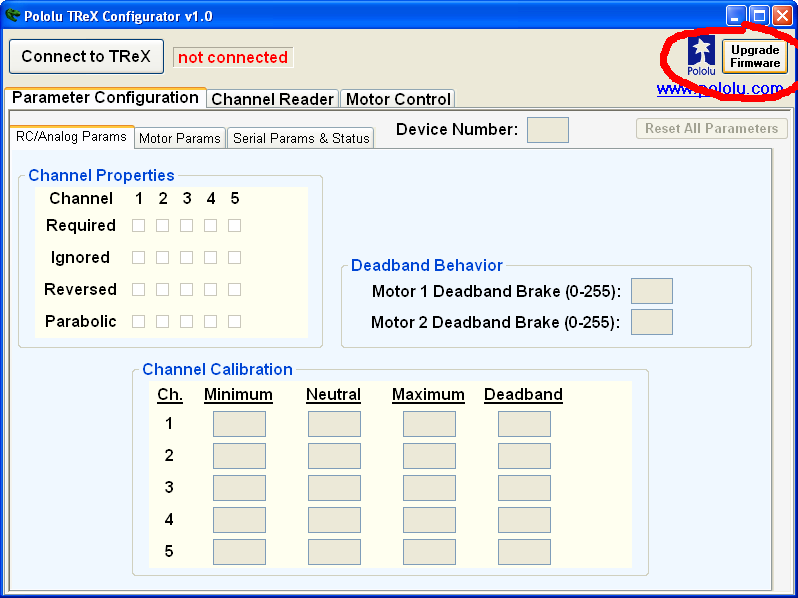
Run the TReX Configurator program and click on the “Upgrade Firmware” button, which is circled in the screen capture below.
 |
This will bring up the Firmware Upgrade dialog, as shown below.
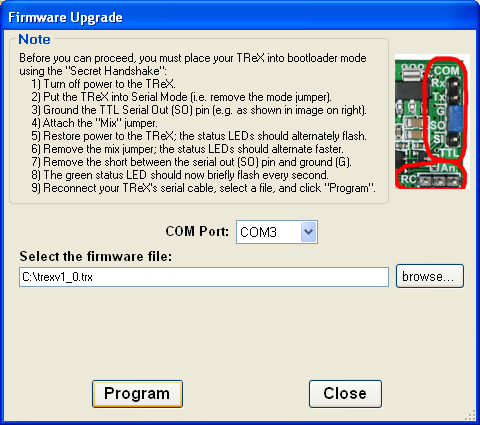 |
Select the COM port your TReX is connected to and enter the firmware update file’s path. Click the Program button to initiate the firmware update. If all goes correctly, you will be prompted to confirm that you want to erase your current firmware and you will then see a progress bar showing you the status of the upload. If no errors occur, you will see a success message when the update is finished.
Option 2: using a terminal program
If you would rather use a terminal program, you will need one that is capable of transferring binary files, such as Tera Term Pro. Connect to the serial port that your TReX is on at 115.2 kbsp with 8-bit characters, no parity, and one stop bit. No flow control is necessary. If you have completed the 8 steps above (so that the green status LED is flashing once per second), you are ready to upload the new firmware file. First, transmit the characters:
‘l’, ‘o’, ‘a’, ‘d’
As you type these lowercase letters, you should see the capital versions echoed back to you, followed by the bootloader identifier: LOADTReXBL1.2:. If you make a mistake, you should receive a ‘?’ and should start typing ‘load’ again from the beginning.
Next, transmit the character ‘s’. This will erase the current firmware. Finally, transfer the firmware update file (.trx) to the TReX as a binary file. If everything works correctly you should see a ‘*’ appear and the TReX’s red status LED will flash five times as it starts up before staying solidly on.
Related products


Home | Forum | Blog | Support | Ordering Information | Wish Lists | Distributors | BIG Order Form | About | Contact
© 2001–2024 Pololu Corporation



