Orangutan X2 Robot Controllers »
Orangutan X2 with VNH2 and LCD
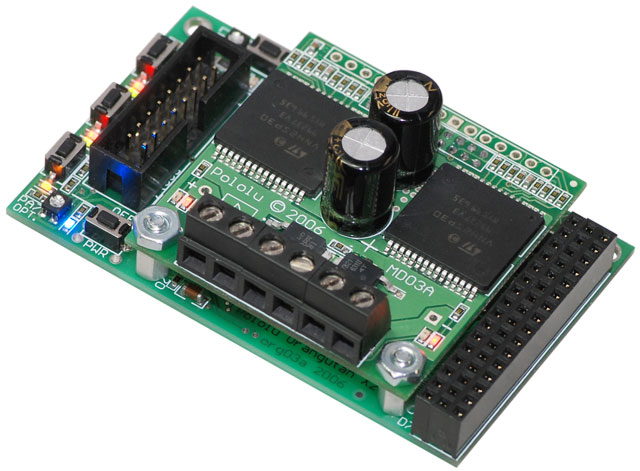
This robot controller is by far the most powerful Orangutan, and it is intended for small and medium-sized robots. The design features a dual-AVR architecture that leaves an ATmega1284P AVR microcontroller almost completely available to the user while taking care of low-level motor control tasks on a pre-programmed mega328, which also doubles as a programmer for the master processor. This is our top-of-the-line version, featuring VNH2SP30 motor drivers and a 4-line x 20-character LCD.
Alternatives available with variations in these parameter(s): motor driver LCD included? Select variant…

| Description | Specs (18) | Pictures (5) | Resources (24) | FAQs (0) | On the blog (0) | Distributors (0) |
|---|
Documentation and other information
-
Pololu AVR C/C++ Library User’s Guide (Printable PDF)
Information about installing and using the C/C++ libraries provided for use with Pololu products.
-
CP2102 USB-to-Serial Bridge Driver Installation (Printable PDF)
CP2102 Drivers and installation instructions for Windows, Mac, and Linux. The CP2102 is used on the Pololu USB-to-Serial Adapter, the Orangutan USB Programmer, the USB 16-Servo Controller, and the Orangutan X2.
-
Pololu AVR Library Command Reference (Printable PDF)
A reference to commands provided in the Pololu C/C++ and Arduino libraries for the AVR.
-
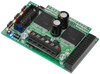
Orangutan X2 Command Documentation v1.01 (Printable PDF)
Documentation of the low-level SPI commands used to control the Orangutan X2’s auxiliary ATmega328 microcontroller. These commands are implemented by the Pololu AVR Library, so beginners do not need to concern themselves with the details in this document.
-
Programming Orangutans and the 3pi Robot from AVR Studio 4
Guide for programming Orangutans and the 3pi robot from the Atmel’s older AVR Studio 4 IDE. It covers installing the Pololu AVR C/C++ Library, and setting up the Pololu USB AVR Programmer.
File downloads
-
Orangutan X2 quick-start guide and schematic (4MB pdf)
-
Orangutan X2 schematic (63k pdf)
-
VNH3SP30 motor driver datasheet (586k pdf)
-
VNH2SP30 motor driver datasheet (670k pdf)
-
Crystalfontz CFAH2004K-YYH LCD datasheet (3MB pdf)
-
Orangutan X2 firmware update procedure (330k pdf)
-
Orangutan X2 firmware v1.01 (65k zip)
This firmware update fixes several minor bugs that were present in the initial firmware release v1.00.
-
Orangutan X2 firmware v1.02 (64k zip)
This is an optional, minor firmware upgrade that slightly improves reset/program button debouncing.
-
LSM303DLM Orangutan example project (5k zip)
This sample program shows how to use an LSM303DLM 3D compass and accelerometer carrier with an Orangutan robot controller to build a tilt-compensated digital compass. The AVR Studio project is set up for an ATmega328P microcontroller, but it will work on other Orangutans with simple changes to the project configuration.
Recommended links
-
WinAVR
A free, open-source suite of development tools for the AVR family of microcontrollers, including the GNU GCC compiler for C/C++.
-
AVR Studio 4
The older version of Atmel’s free integrated development environment (IDE) for AVRs, which is no longer supported by Atmel.
-
ATmega1284P documentation
Microchip’s product page for the ATmega1284P.
-
AVR Libc Home Page
The web site for AVR Libc, which is the standard library of functions that you can use with C and C++ on the AVR.
-
GCC, the GNU Compiler Collection
Documentation for GCC, including the AVR GCC C/C++ compilers.
-
Pololu Robotics Forum
Pololu Robotics and Electronics forum — get technical support, share your project, or just drop in to say hi.
-
Orangutan-lib
An open-source C library for the Orangutan family of robot controllers. Note: this library was not created by and is not maintained by Pololu; it contains only limited support for the Orangutan X2 and does not directly support the Orangutan SV-168, Orangutan LV-168, or Baby Orangutan B revision.
-
AVR Freaks
AVR community with forums, projects, and AVR news.
-
Tutorial: AVR Programming on the Mac
Customer Michael Shimniok has written a guide to programming AVRs (the Orangutan LV-168, specifically) using the Mac.
-
3kg Sumo by Tom Saxton
The Pololu Orangutan X2 robot controller is the brains of this 3kg sumo robot.
Related products


Home | Forum | Blog | Support | Ordering Information | Lists | Distributors | BIG Order Form | About | Contact
© 2001–2026 Pololu Corporation



